
How to Connect Semrush to MCP Server: Step-by-Step Guide
How to Connect Semrush to MCP Server: Step-by-Step Guide
The traditional workflow for SEO professionals and digital marketing agencies has reached a critical bottleneck: the "manual context gap." For over a decade, we have operated in a cycle of fragmentation. We log into Semrush, export a CSV of keyword rankings, manually clean the data in Excel, and then, more recently, copy and paste snippets of that data into Large Language Models (LLMs) like Claude or ChatGPT.
This process is fundamentally flawed. When you paste static data into an AI, the resulting insights are "contextually shallow." The AI lacks a programmatic link to the source of truth. It cannot see the fluid reality of the SERPs, it cannot cross-reference a traffic drop in real-time against a backlink loss, and it certainly cannot "reason" across your entire tech stack. It is grounded in a snapshot, and in the world of SEO, snapshots expire in minutes.
We are moving into the era of AI-driven SEO, defined by the Model Context Protocol (MCP). Developed as an open standard by Anthropic, MCP eliminates these data silos. It provides a universal, programmatic gateway that allows AI models to access external tools and data sources on demand. By connecting Semrush to an MCP server, you transform your AI assistant from a simple chatbot into a high-powered, autonomous SEO architect.
This guide is designed for the Senior Technical SEO Strategist and the AI Solutions Architect. It provides a deep-dive, technical walkthrough of integrating Semrush with the MCP framework, ensuring your AI workflows are grounded in live, high-integrity data.
Understanding the Model Context Protocol (MCP) Framework
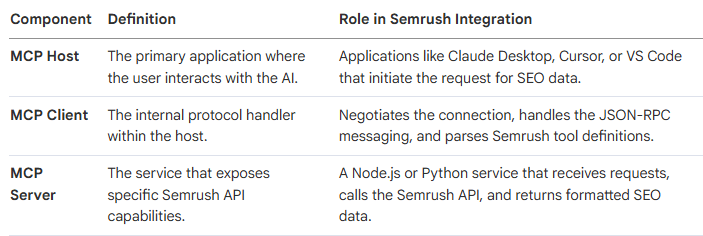
To successfully integrate Semrush data into an AI environment, we must first deconstruct the architecture of the Model Context Protocol. MCP is not a single software product; it is a communication standard, a "bridge" that allows an AI (the Host) to interact with a set of tools (the Server) via a standardized interface (the Client).
This separation of concerns is vital. The LLM handles the "reasoning," while the MCP server handles the "retrieval." This prevents "hallucinations" because the AI is restricted to the specific data returned by the server.
The Three Pillars of MCP Architecture
The Programmatic Advantage: From Search to Reasoning
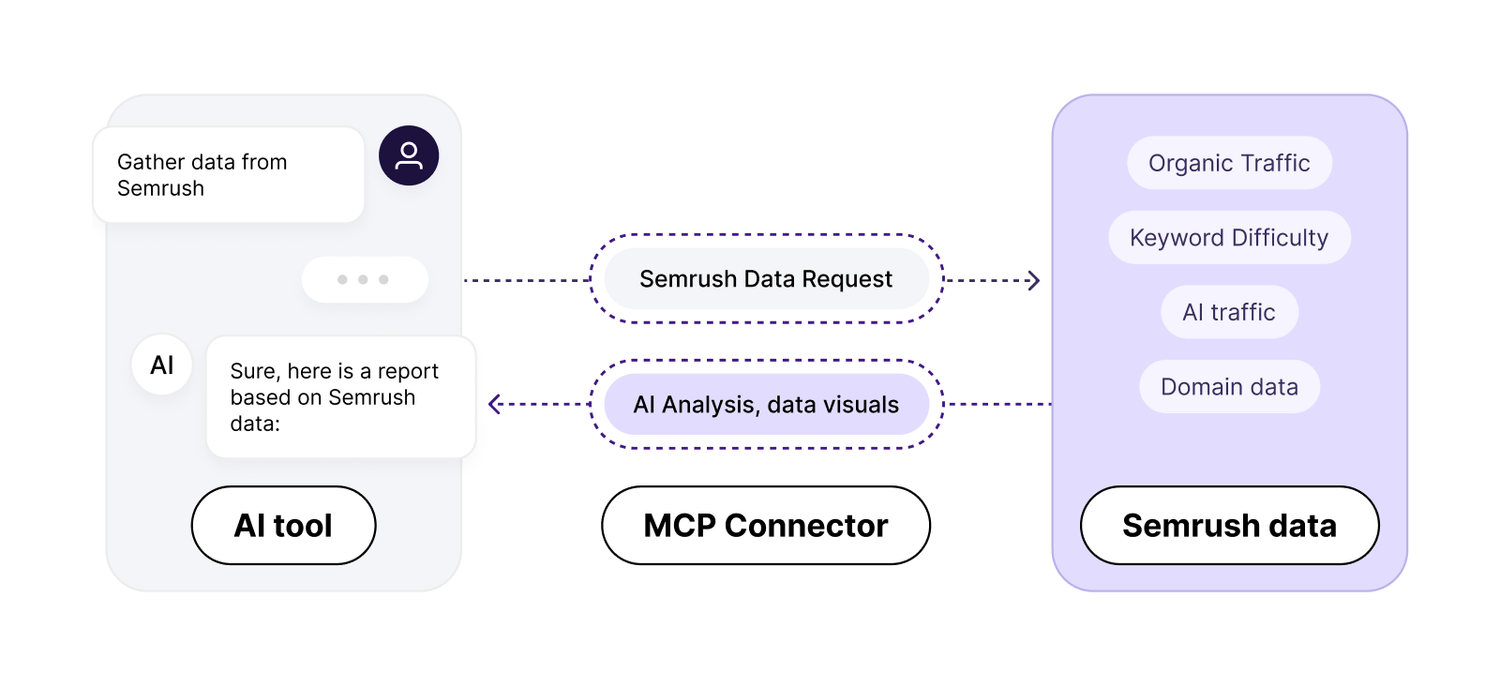
In an MCP-enabled environment, the AI assistant does not "browse the web" in a general, unfocused sense. Instead, when you ask a question like "Why is my organic traffic declining for [Domain]?", the AI identifies that it has a "Tool" called semrush_domain_overview.
It executes a programmatic API call through the MCP Server, receives the data, and then, crucially, uses its internal reasoning capabilities to compare that data against your previous prompts or other connected data sources like Google Search Console. This is "intelligence-grounded" SEO.
Semrush MCP: Remote vs. Local (Self-Hosted) Deployments
Architects must choose between two deployment patterns. This decision dictates your agency’s data sovereignty, security posture, and customizability.
Option A: The Remote MCP Server (Hosted by Semrush)
Semrush maintains an official, hosted MCP server at mcp.semrush.com. This is the "Easy Way."
Best For: Individual consultants, rapid testing, and users who do not wish to manage a Node.js environment.
Pros: Zero maintenance; official support; easy authentication via OAuth; no local infrastructure required.
Cons: Limited control over caching; no ability to inspect the underlying code; reliance on Semrush’s infrastructure uptime; lack of custom rate-limiting.
Option B: The Self-Hosted/Local MCP Server (The Developer Way)
Using the community-maintained Semrush-MCP (available on GitHub), you run the server on your own workstation or a private Virtual Private Server (VPS).
Best For: SEO agencies, enterprise marketing teams, and AI engineers building proprietary automation.
Pros: Total data sovereignty; ability to set custom cache TTLs (Time-To-Live); custom rate-limiting to protect API units; includes a CLI (Command Line Interface) for coding agents like Claude Code.
Cons: Requires Node.js installation; manual configuration of environment variables; requires managing local log files.
Comparison: Choosing Your Path
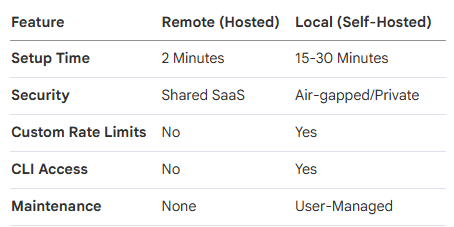
Architect's Note: For any agency handling sensitive client data, the Self-Hosted route is non-negotiable. It provides an audit trail of every API call and ensures that your API keys are never stored on a third-party server.
Preparation: Securing Your Semrush API Credentials
Regardless of your chosen method, the integration is fueled by Semrush API Units. You must secure your credentials and understand the "economy" of these units to prevent budget overruns.
Step 1: Obtaining the API Key
Log in to your Semrush account.
Navigate to your User Profile (top right).
Click Subscription Info.
Select the API Units tab.
Copy your unique API Key. Store this in a secure manager like 1Password; do not leave it in plain text.
Step 2: Understanding the API Unit Economy
Every tool call consumes units. If you are not specific in your prompts, the AI can "burn" through units by requesting global data instead of specific regions.
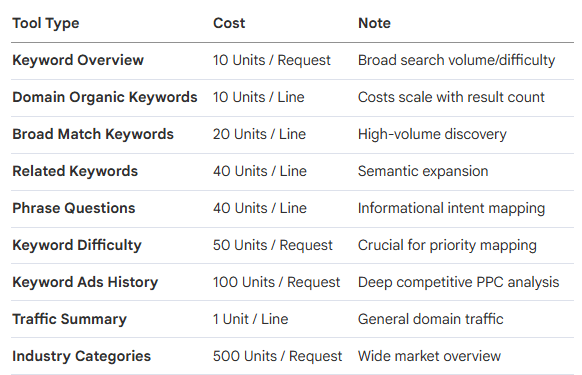
Strategic Pro-Tip: Use the display_limit parameter in your prompts (e.g., "Show me the top 10 keywords...") to significantly reduce unit consumption.
Method 1: Connecting to the Official Semrush Remote MCP
The official hosted connector is ideal for platforms like Dust or the "Manage Connectors" feature in Claude Desktop.
Setup for Claude Desktop
Open the Claude Desktop application.
Click the + (Plus) icon in the chat interface.
Navigate to Connectors > Manage Connectors.
Search for Semrush.
Select Connect. You will be redirected to an OAuth flow where you log in with your Semrush credentials.
Once authorized, the tools are immediately available in the chat interface.
Setup for Dust (Enterprise AI Teams)
In your Dust workspace, go to Spaces > Tools.
Click Add Tools and find the Semrush MCP.
Authorize via the OAuth flow.
You can now assign this tool to specific Agents in Dust, allowing you to create an "SEO Specialist" agent that has exclusive access to your Semrush data.
Method 2: Setting Up a Private Semrush MCP Server
For the technical strategist, self-hosting is the path to building a proprietary agency asset. This requires a Node.js environment (v18+).
Step 1: Global Installation
Open your terminal (Terminal on macOS, PowerShell/Command Prompt on Windows) and execute:
npm install -g @mrkooblu/semrush-mcp
Note: You can also use npx @mrkooblu/semrush-mcp for a zero-install execution, but global installation is recommended for stability.
This installation provides two critical entry points:
Semrush-mcp: The server that communicates with Claude/Cursor.
Semrush: A CLI tool for direct terminal use, ideal for AI coding agents like Claude Code.
Step 2: Environment Configuration (.env)
You must create a configuration file to store your credentials securely. Navigate to your project folder and create a file named .env.
The Absolute Required Configuration:
SEMRUSH_API_KEY=your_api_key_here
API_CACHE_TTL_SECONDS=300
API_RATE_LIMIT_PER_SECOND=10
LOG_LEVEL=info
API_CACHE_TTL_SECONDS: Set this to 3600 (1 hour) for competitive research to save units, or 300 for live ranking checks.
API_RATE_LIMIT_PER_SECOND: Lower this if you share the key across multiple team members to avoid 429 "Too Many Requests" errors.
Step 3: Expanding to a Unified Infrastructure (OAuth 2.0)
If you intend to use the advanced capabilities found in the Livewire framework—integrating Google Search Console (GSC) and GA4 alongside Semrush—you must set up a Google Cloud Project.
Create the Google Cloud Project:
Go to console.cloud.google.com.
Create a "New Project" named Agency MCP Server.
Enable the Google Search Console API and Google Analytics Data API.
Create OAuth Credentials:
Go to APIs & Services > Credentials.
Create an OAuth Client ID (Type: Web Application).
Add https://developers.google.com/oauthplayground as an Authorized Redirect URI.
Copy your Client ID and Client Secret.
Generate the Refresh Token:
Go to the OAuth 2.0 Playground.
In settings (gear icon), check "Use your own OAuth credentials" and paste your ID and Secret.
Select the scopes for Search Console (webmasters.readonly) and GA4 (analytics.readonly).
Exchange the authorization code for a Refresh Token.
Add GOOGLE_REFRESH_TOKEN=... to your .env file.
Technical Warning: In src/server.js (if using the community build), you must ensure the path to your .env is absolute: require('dotenv').config({ path: '/FULL/PATH/TO/.env' });. If this path is relative, Claude Desktop will fail to load the environment variables.
Step-by-Step Configuration for Claude Desktop
Claude Desktop is the premier host for MCP. To connect to your local server, you must edit its configuration JSON file.
File Locations
macOS: ~/Library/Application Support/Claude/claude_desktop_config.json
Windows: %APPDATA%\Claude\claude_desktop_config.json
The "Architect's" JSON Configuration
Open the file in VS Code or a text editor. You must provide absolute paths. On Windows, you must use double backslashes to avoid escape character errors.
{
"mcpServers": {
"semrush": {
"command": "node",
"args": [
"/USERS/YOURNAME/TOOLS/semrush-mcp/dist/index.js"
],
"env": {
"SEMRUSH_API_KEY": "your_actual_key_here"
},
"cwd": "/USERS/YOURNAME/TOOLS/semrush-mcp"
}
}
}
Critical Setup Rules for Success:
Absolute Paths: Never use ~/ or ./. Use /Users/name/... or C:\\Users\\name\\....
Restart Rule: You must fully quit Claude Desktop. Closing the window is insufficient. Right-click the system tray icon (Windows) or use Cmd+Q (Mac).
Validate JSON: Use a JSON linter. A missing comma in this file will cause Claude to silently disable all MCP integrations.
Deep Dive: The 77+ Tools and Capabilities
The Semrush MCP integration exposes a massive surface area for SEO analysis. The Semrush-MCP implementation categorizes these into specialized tools that the AI can call.
Domain Analytics (13 Tools)
The core of competitive intelligence.
semrush_domain_overview: Traffic, keywords, and rank across all databases.
semrush_domain_organic_keywords: Detailed rankings list for a domain.
semrush_competitors: Identification of organic overlap competitors.
semrush_domain_ads_history: 12-month history of PPC bidding.
semrush_domain_shopping: Shopping/PLA keyword tracking.
Keyword Research (10 Tools)
Grounding content strategy in search demand.
semrush_keyword_overview: High-level search volume and intent.
semrush_keyword_difficulty: The "top 10" competition index.
semrush_phrase_questions: Pulls "How to" and "What is" queries for content clusters.
semrush_related_keywords: Semantic variations to avoid keyword stuffing.
semrush_batch_keyword_overview: Analyze up to 100 keywords in a single call (highly unit-efficient).
Backlink Analysis (7 Tools)
Authority monitoring and link-building research.
semrush_backlinks_overview: General authority score and link counts.
semrush_backlinks_anchors: Identifying branded vs. optimized anchor text.
semrush_backlinks_categories: Topic-level distribution of the referring profile.
semrush_backlinks_tld: Geographic/TLD distribution of links.
Traffic & Audience (.Trends Required - 17 Tools)
Advanced market intelligence and behavioral data.
semrush_traffic_sources: Breakdown of traffic by Direct, Social, Paid, and—uniquely—AI Assistants and AI Search.
semrush_audience_insights: Overlap analysis between up to 5 domains.
semrush_geo_distribution: Where in the world the audience originates.
semrush_purchase_conversion: Estimated percentage of sessions ending in a purchase.
semrush_audience_interests: Category-level behavioral profiling.
Projects & Site Audit (13 Tools)
Technical SEO maintenance via natural language.
semrush_site_audit_launch: Trigger a fresh crawl from the chat.
semrush_site_audit_issues: Retrieve the list of Errors, Warnings, and Notices.
semrush_site_audit_snapshot_detail: Compare current snapshot vs. previous.
Local SEO Tools
Listing Management API: Update locations globally.
Map Rank Tracker API: Track local pack visibility and heatmaps.
Prompt Engineering: The "Semrush Prompt Library"
Accessing the data is only the beginning. To avoid burning through units and to get "Architect-level" responses, you must use precise prompt engineering.
Strategy: The "Specific to Save Units" Framework
Never ask, "Analyze this domain." It is too broad. Use constraints.
Effective Prompt Examples:
Keyword Gap Analysis: "Using the UK database, analyze the keyword gap between [Domain A] and [Domain B]. Provide the top 10 keywords where [Domain B] ranks in positions 1-5 and [Domain A] is not in the top 20."
Content Opportunity: "Fetch the top 10 'phrase questions' related to 'Enterprise SEO software.' Cross-reference their keyword difficulty and identify the 3 with the highest volume but lowest difficulty."
PPC Competitor Audit: "Using the semrush_domain_ads_history tool, look at [Competitor]'s bidding patterns for the last 12 months. Which months did they increase spend, and what were their top 5 ads during those peaks?"
Site Audit Triage: "Get the latest site audit issues for [Project ID]. Group the errors by 'Criticality' and provide a step-by-step remediation plan for the top 3 'Error' items."
Agency Case Study: The "Unified Technical Audit" Playbook
To reach production-grade automation, an agency shouldn't just query one tool. They should chain tools together.
Scenario: The 10,000-Page Migration Audit
An agency is migrating a client from Magento to Shopify. The "Architect" uses the MCP server to:
Map Reality: Query semrush_domain_organic_pages to find the top 100 pages currently driving traffic.
Verify Performance: Chain this with semrush_backlinks_pages to identify which of those top pages have the most external authority.
Technical Check: Run semrush_site_audit_launch post-migration and use semrush_site_audit_issues to immediately flag 404 errors on those high-authority pages.
Reporting: The AI assistant takes all this data and drafts a "Post-Migration Crisis Report" for the client within minutes of the crawl finishing.
Enterprise Governance: The MCP Gateway
For agencies with 10+ employees, managing individual config.json files and API keys is an operational nightmare. This is where an MCP Gateway (like MCP Manager) is required.
The Risks of Non-Governed MCP
Rug Pull Attacks: A malicious server update that exfiltrates your API key to an external IP.
Tool Poisoning: Providing the AI with false data that leads to incorrect strategic recommendations.
Data Cross-Pollination: Accidentally passing Data from Client A into the reasoning context for Client B.
The Gateway Solution
An MCP Gateway provides a centralized URL that you paste into every team member’s Claude Desktop.
Audit Logging: You see every tool call, which user made it, and how many units it cost.
PII Detection: Automatically masks client-sensitive information before it reaches the LLM.
Centralized Key Management: Update your Semrush API key in one place, and it propagates to the entire team.
Troubleshooting Common Integration Errors
Even with a perfect setup, technical friction occurs. Use this diagnostic guide to resolve issues quickly.
401 / 403 Unauthorized
Cause: Invalid API key or expired OAuth token.
Resolution: Verify units balance in the Semrush UI. If using GSC/GA4, refresh your token via the OAuth Playground. Ensure the .env file uses the format SEMRUSH_API_KEY=key with no spaces.
JSON-RPC / Stdout Errors
Cause: A common developer mistake where the server prints logs to stdout (standard output). MCP uses stdout for communication; any other text corrupts the message.
Resolution: Ensure all server logging uses console.error(), which writes to stderr.
Connection Failures in Claude
Cause: Relative paths or lack of a full restart.
Resolution:
1. Check mcp.log on macOS: ~/Library/Logs/Claude/mcp.log.
2. Ensure Windows paths use \\ (e.g., C:\\Users\\Name\\...).
3. Verify the cwd (Current Working Directory) is set to the folder where index.js lives.
Rate Limiting (429 Errors)
Cause: Exceeding your plan's RPS (Requests Per Second).
Resolution: Adjust API_RATE_LIMIT_PER_SECOND in your .env file to a safer value like 2 or 5.
Conclusion: Building a Proprietary Agency Asset
Integrating Semrush with the Model Context Protocol is not a "neat trick"—it is a fundamental shift in how we value SEO expertise. By moving from manual data handling to programmatic infrastructure, you are building a proprietary asset for your agency.
The value of this setup compounds. As you refine your prompt library, integrate more data sources (GSC, GA4, CRM), and deploy governance layers, your AI assistant becomes an "extension of the strategist." You move from a reactive posture—reacting to traffic drops after the fact—to a proactive posture where AI agents monitor your clients' digital health 24/7.
In the new era of search, the winners won't be the ones with the most tools; they will be the ones with the best-integrated infrastructure. The Semrush MCP is your first step toward that future.


Ako Reviews Blog is a platform dedicated to helping online businesses reach their full potential. It offers in-depth guides on product reviews, social media marketing, and comprehensive online business strategies. Whether you're an entrepreneur or a marketer, Ako Reviews Blog provides practical tips and expert insights to help you grow and succeed in the digital marketplace.
Stay informed with valuable tips delivered straight to your inbox.
Created with systeme.io 2026 | Home | Privacy Policy | Terms and Conditions | Disclaimer | Contact