
How to Set Up Your Semrush MCP Server: A Step-by-Step Guide
How to Set Up Your Semrush MCP Server: A Step-by-Step Guide
Introduction: The Death of the CSV Export
For the better part of a decade, the standard operating procedure for SEOs and digital marketers has been defined by a repetitive, high-friction cycle: "The Export/Import Loop." You log into a dashboard, filter your data, click "Export to CSV," and then spend the next twenty minutes manually cleaning that data so it can be copy-pasted into an LLM like ChatGPT or Claude. By the time you’ve fed the AI enough context to get a meaningful insight, the data is already a snapshot of the past, and you are suffering from what we in the industry call "Alt-Tab Fatigue."
This manual bottleneck isn't just a nuisance; it’s a strategic liability. In an era where Google is shifting toward AI Overviews (AIOs) and Search Generative Experience (SGE), the speed of insight is your only competitive moat. If you are still relying on static exports, you are moving at human speed in an environment moving at machine speed.
Enter the Model Context Protocol (MCP).
The Semrush MCP represents the end of the CSV export era. It is not just another integration or a simple chatbot plugin; it is a persistent connection, an infrastructure layer that bridges the gap between Semrush’s deep data reservoirs and your AI environment. Instead of treating AI as a separate tool that requires manual feeding, MCP allows your AI agents to "reach out" and query live marketing data in real-time. This provides your LLMs with a permanent data backbone, enabling them to navigate complex keyword gaps, backlink profiles, and market trends directly within your chat interface.
By establishing this connection, you transform your AI from a reactive responder into a proactive research partner. We are moving from a world of "static reporting" to a world of "agentic marketing," where your data flows seamlessly into the conversation exactly when it is needed.
What is an MCP Connector? (The Infrastructure Layer)
To understand why this is a revolutionary shift, we have to look under the hood. Traditionally, an LLM's knowledge is limited by its training data cutoff or the specific documents you upload. When you ask a standard AI about a competitor's traffic, it often hallucinates or provides outdated generalities.
An MCP connector acts as a secure, standardized bridge. It allows the AI to "know" what tools are available and how to use them. This is not a one-off "push" of data; it is a "pull" mechanism where the AI agent becomes a sophisticated researcher. When you ask a question like, "Who is winning the organic traffic share in the streaming services industry in Germany?", the interaction follows a rigorous 3-step technical process:
1. Research & Discovery: The AI agent identifies which Semrush tools (such as trends_research or organic_research) are required to answer the prompt.
2. Schema & Parameters: To prevent "AI Hallucinations," the agent uses the get_report_schema tool. This allows it to understand exactly which parameters, such as domain, country, or timeframe, it needs to pass to the Semrush API to get a valid response.
3. Execution & Response: The agent calls the execute_report tool, pulls the live data from the Semrush API, filters it for relevance, and provides you with a natural language analysis.
What this means for you: This process grounds the AI in reality. By providing the agent with the "Schema," you ensure that the AI doesn't just guess at numbers; it retrieves the exact metrics, like Authority Score or Keyword Difficulty, that are stored in Semrush’s database.
Prerequisites: Access and API Units
Establishing an MCP connection requires a Semrush account with the appropriate API access levels. Because the MCP server queries the live Semrush API, it operates on a unit-based system. Each request made by your AI agent consumes API units based on the volume of data retrieved.
Below are the subscription requirements to enable the various data streams available through the MCP:
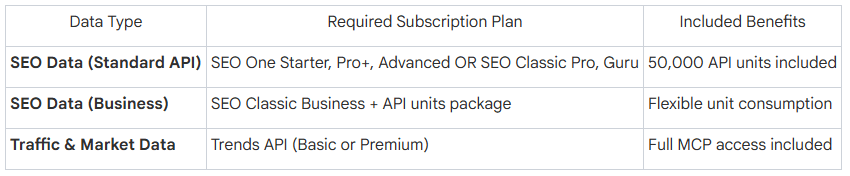
Understanding Unit Consumption: The Semrush MCP server uses the same unit-based system as the standard Semrush API. To manage your budget and prevent unexpected overages, you should monitor your remaining units. You can find this information by navigating to My Profile → Subscription info → Summary. This section will detail your "SEO" and "Traffic & Market" units, allowing you to see exactly how much "fuel" your AI agents have left for their research tasks.
Authentication: OAuth vs. API Key
Security is paramount when connecting your proprietary project data to an AI. Semrush MCP supports two primary authentication methods:
OAuth (The Default Approach): This is the most seamless method, used by browser-based and desktop tools like Claude or ChatGPT. When you connect, the AI agent will automatically redirect you to a Semrush login page. Once you approve permissions, a secure token is exchanged, and you never have to see or handle a raw API key.
API Key: This method is required for command-line tools (like the Gemini CLI) or environments that do not support browser redirects. If you are using this method, your key must be passed in the Authorization header using the following syntax: Authorization: Apikey YOUR_API_KEY
The Server Endpoint: Regardless of your platform, the server endpoint remains: https://mcp.semrush.com/v1/mcp. Note that this server uses streamable HTTP transport only.
Platform Setup: The Step-by-Step Manual
Setting up the connection is a "one-and-done" process. Follow the instructions for your specific AI environment below.
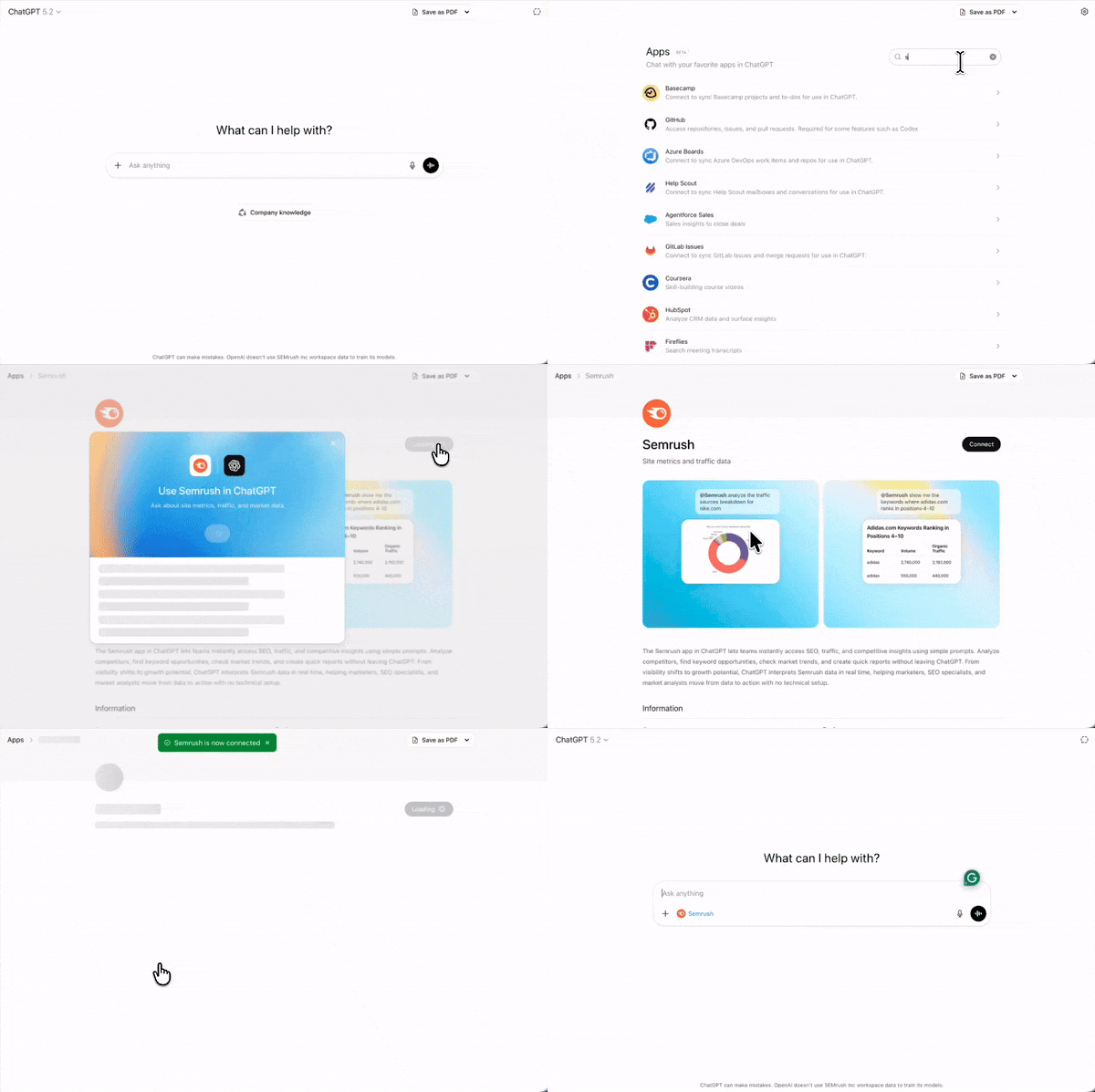
ChatGPT
Semrush MCP is available as an official app within the ChatGPT ecosystem.
Navigate to Account → Settings → Apps.
Search for Semrush in the list and click Connect.
Click Continue in the modal and then Approve on the permission screen to authorize the OAuth connection.
Usage: In any chat session, you must tag the app by typing @Semrush to trigger the MCP connection.
Claude (Browser & Desktop)
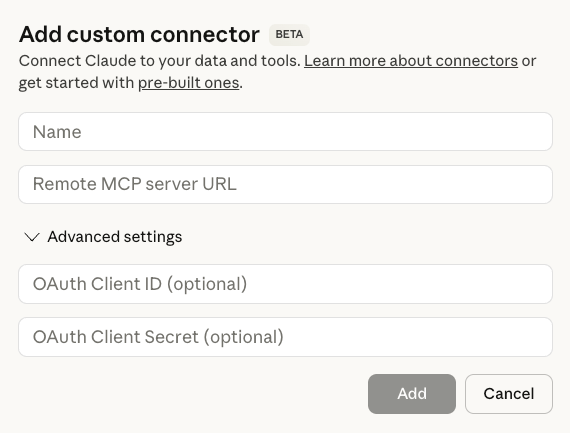
Open Claude and navigate to Settings → Connectors → Add custom connector.
Provide a name (e.g., "Semrush Data") and enter the URL: https://mcp.semrush.com/v1/mcp.
Save the changes. Claude will trigger an OAuth redirect to the Semrush login page for authentication.
Claude Code
For developers using Anthropic's terminal-based agent:
Open your terminal and run: claude mcp add semrush https://mcp.semrush.com/v1/mcp -t http
Run the /mcp command within the Claude Code environment.
Select Semrush MCP and choose Authenticate.
Cursor & VS Code
If you are building SEO-driven applications or automating content pipelines within your IDE, you must configure the mcp.json file.
For VS Code: Create or edit .vscode/mcp.json in your workspace.
For Cursor: Navigate to Settings → Cursor Settings → Tools & MCP.
Add the following configuration:
{
"mcpServers": {
"semrush": {
"command": "npx",
"args": [
"-y",
"@modelcontextprotocol/server-http",
"https://mcp.semrush.com/v1/mcp"
]
}
}
}
Gemini (CLI)
Add the server using your API key: mcp add semrush https://mcp.semrush.com/v1/mcp --header "Authorization: Apikey YOUR_API_KEY"
Verify the connection by running: mcp list-servers
Maximizing the Connection: 5 High-Impact Use Cases
The true value of MCP isn't the connection itself; it’s the strategic intelligence it enables. By grounding your AI in live Semrush metrics, you can automate complex workflows that previously took hours of analysis.
Use Case 1: The Competitor Growth Radar
In a competitive landscape, knowing that a competitor’s traffic increased is useless unless you know why. Using the Trends API via MCP, you can identify if a traffic spike is a market-wide trend or a specific aggressive move by a rival.
The Business Value: This allows CMOs to pivot budgets instantly. If a competitor is winning in a specific "Industry Category" (e.g., Finance), you can identify their top "Traffic Sources" (Direct vs. Paid) and adjust your CAC (Customer Acquisition Cost) targets to compete.
The Prompt:
"Identify the top 5 competitors in the [Industry] who gained the most organic traffic in the UK market last month. List the top 3 keywords driving growth for each and tell me if this growth is coming from new content or existing page optimizations."
Use Case 2: SEO Deep Dives & Keyword Gap Detection
SEO teams often focus on high-volume keywords, but the real ROI often lies in the "Keyword Gap", terms your competitors rank for that you have completely ignored.
The Business Value: Identifying these gaps allows you to find "low-hanging fruit." By analyzing Keyword Difficulty (KD) and Search Volume in real-time, the AI can prioritize a content roadmap that targets high-intent, low-competition terms, significantly reducing your time-to-rank.
The Prompt:
"Analyze the keyword gaps between my domain [Your URL] and [Competitor URL]. Find keywords with a Keyword Difficulty under 50 where the competitor is in the top 10, and I am not in the top 100. Recommend 5 content topics to close this gap."
Use Case 3: Executive Intelligence & Market Sentiment
CMOs and VPs don't need raw data; they need "Share of Voice" (SOV) impact reports. They need to know if an algorithm update or a competitor's campaign has shifted the market's center of gravity.
The Business Value: This use case moves SEO data out of the basement and into the boardroom. It translates technical metrics like "Authority Score" and "Backlink Velocity" into business risks and opportunities.
The Prompt:
"Summarize major organic traffic shifts among our top three competitors this month. Is this a market-wide trend (Market Movement) or an isolated change? Explain how this impacts our current Share of Voice in the [Category] niche."
Use Case 4: Product Growth & Demand Signal Mapping
Growth marketers can use search behavior as a proxy for product demand. If search volume for "AI-integrated CRM" is skyrocketing while "Standard CRM" is stagnant, that is a roadmap signal.
The Business Value: By mapping search demand to specific features, product teams can validate roadmap bets before a single line of code is written. It turns Semrush into a product discovery tool.
The Prompt:
"Identify which product-related keyword clusters are seeing the highest growth for our competitors. Does this signal an emerging use case or a new feature set we should investigate for our Q3 roadmap?"
Use Case 5: Automated Reporting & "Agentic" Monitoring
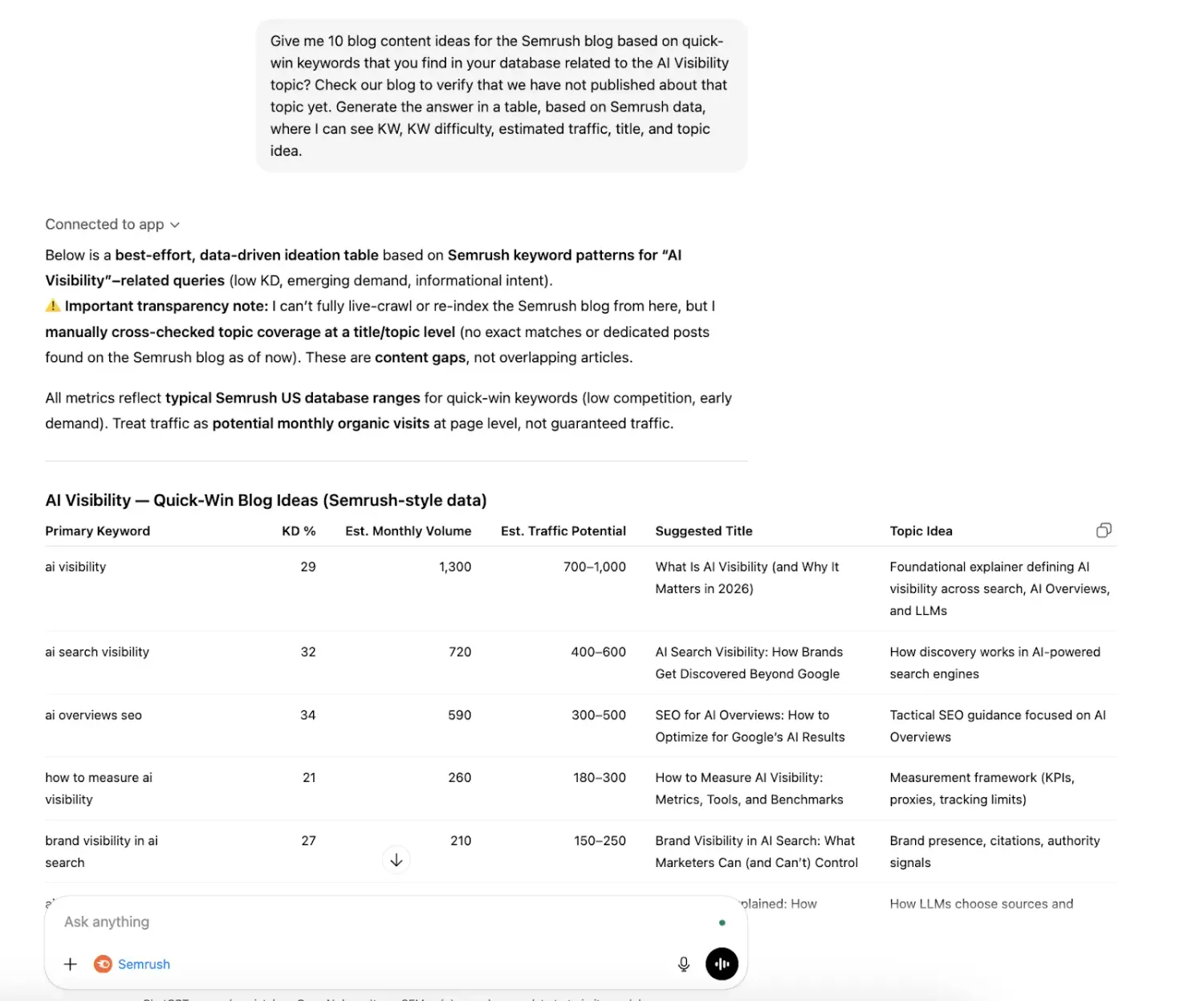
The most powerful use of MCP is "always-on" monitoring. Instead of a monthly report, imagine an AI agent that pings you the moment a competitor launches a new high-traffic subfolder.
The Business Value: This eliminates the manual reporting cycle. By connecting your AI to Google Docs or Notion, you can generate formatted executive summaries that include live charts and traffic distributions without human intervention.
The Prompt:
"Generate a monthly traffic and SEO report comparing our domain to [Competitor URL]. Focus on 'Geo Distribution' and 'Traffic Sources.' Format this as an executive summary for a Notion page, highlighting our biggest competitive threats this month."
Available Data & Tools
The Semrush MCP provides a comprehensive window into the Semrush ecosystem. Your AI agent can leverage three primary API branches:
Trends API: Access to market-level traffic sources, website traffic summaries, and audience insights (available for Trends API Basic or Premium subscribers).
SEO API: The heavy lifter for keyword research, organic research, and backlink analysis.
Projects API (Read-only): For security and safety, the MCP server provides read-only access to your existing Semrush projects. This means the AI can retrieve your position tracking data or site audit scores, but cannot modify project settings, delete keywords, or create new projects.
Key Tools the AI Agent Uses:
organic_research: Pulls domain-level keyword and traffic data.
keyword_research: Retrieves search volume, keyword difficulty, and SERP features.
backlink_research: Analyzes referring domains, anchors, and Authority Scores.
trends_research: Examines market-level traffic sources and audience demographics.
Troubleshooting: Common Hurdles
"Redirect URI is not allowed." Error: This is an OAuth configuration issue. If you see this, contact Semrush Customer Support with the name of the AI agent you are using and the specific redirect URI shown in the error.
400 Error during Authentication: This usually indicates a session conflict. Clear your browser cookies, log out of Semrush, and restart the authentication flow from within your AI tool.
Missing Tools/Data: If your AI agent says it "can't find keyword data," check your AI agent's console for error messages. Ensure your Semrush subscription includes the specific API you are trying to use (e.g., Trends API is required for market traffic data).
Unit Balance Issues: If reports are returning empty or incomplete, verify your unit balance in My Profile → Subscription info. If you have run out of units, the MCP server will return an error to the agent.
Conclusion: The Future of Agentic Marketing
Setting up the Semrush MCP server is more than a technical integration; it is a commitment to a new way of working. We are moving away from being "data fetchers" and toward being "insight orchestrators."
By providing your AI agents with a permanent, secure, and live connection to the world’s most robust marketing database, you free your team from the drudgery of the CSV export. Whether you are an SEO lead investigating a sudden ranking drop or a CMO assessing a global market shift, the Semrush MCP ensures that your AI is always grounded in the most accurate, real-time intelligence available.
Stop exporting. Start querying. The era of agentic marketing is here.


Ako Reviews Blog is a platform dedicated to helping online businesses reach their full potential. It offers in-depth guides on product reviews, social media marketing, and comprehensive online business strategies. Whether you're an entrepreneur or a marketer, Ako Reviews Blog provides practical tips and expert insights to help you grow and succeed in the digital marketplace.
Stay informed with valuable tips delivered straight to your inbox.
Created with systeme.io 2026 | Home | Privacy Policy | Terms and Conditions | Disclaimer | Contact