
Typeset Review 2025: The AI Tool Revolutionizing Content Creation
Typeset Review 2025: The AI Tool Revolutionizing Content Creation
Are you weary of staring down a blank page, struggling to write and design digital content that grabs attention? Wondering if Typeset can finally help you work smarter, not harder? You’re in the right place. In this thorough review, we dive deep into Typeset, the AI-powered design tool that’s promising to transform how entrepreneurs, marketers, creators, and businesses create, collaborate, and distribute digital content.
Introduction to Typeset: Why It’s Generating Buzz
Let’s face it: Creating digital content isn’t what it used to be. Attention spans are shrinking. Audiences are smarter. The competition is fierce. Whether you’re marketing your products, building a brand, or educating customers, having polished, engaging content isn’t a luxury; it’s a necessity.
Design platforms like Canva and Photoshop have served us well. But they require creativity, design skills, and, above all, a lot of time. For busy professionals or solopreneurs, hours spent planning, writing, dragging and dropping, revising, and exporting can be better spent elsewhere.
Enter Typeset, billed as the “AI Design Platform” that designs awesome digital content in seconds.
According to their promise:
Create ebooks, slide decks, social posts, ads, reports, and more 10x faster.
Outsource 95% of your design work to the platform’s automated workflows.
Collaborate with your team and stay organized with everything in one place.
But does Typeset live up to the hype? That’s what this comprehensive review aims to find out.
First Impressions: Getting Started with Typeset
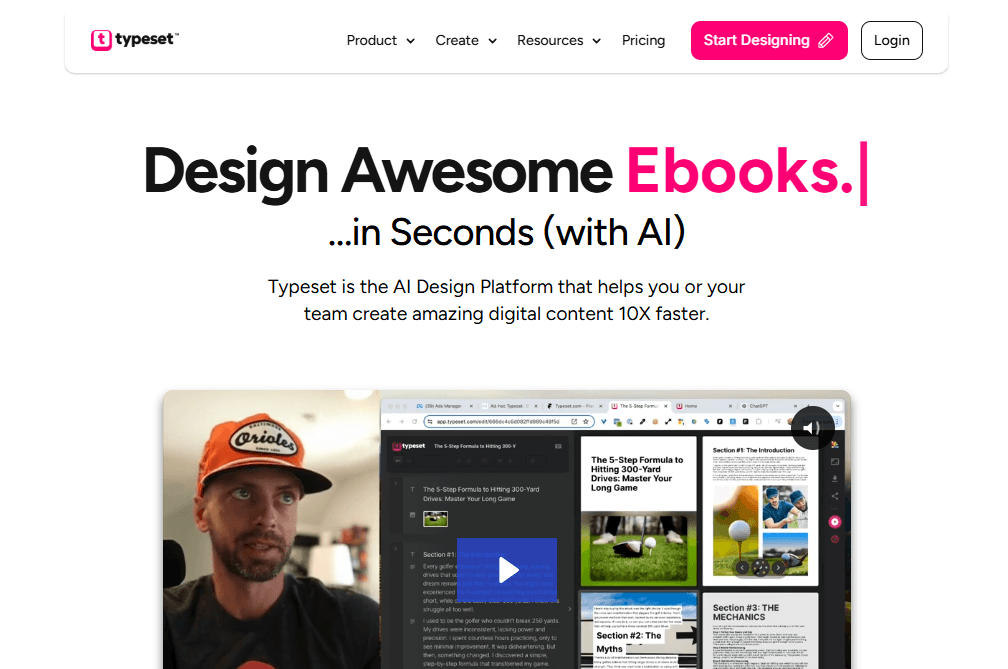
The first step to reviewing any tool is jumping straight in. Signing up for Typeset is refreshingly straightforward, just a few questions about your intended use (business, personal, industry type), and you’re dropped right into a modern, clean dashboard.
At a glance, what stands out:
Minimalist User Interface: No clutter or distractions, only the essential tools. Great for reducing overwhelm.
Onboarding Tutorial: Easy, digestible walk-throughs show how to create your first project, from ideation to export. Even a total beginner can publish in minutes.
AI Assistant Prompts: Typeset starts by nudging you to enter a topic or idea, after which its AI kicks in, writing, outlining, and designing as if by magic.
The feeling? For anyone who’s wasted hours staring at a blank page or sorting through Dropbox folders for that “one version” of a template, it feels like a potential game-changer.
Core Features: What Makes Typeset Stand Out?
Typeset isn’t just a Canva alternative; it’s an intelligent platform built around next-generation AI.
Let’s dig into what it actually does:
CoAuthor AI: Never Fear Writer’s Block
Struggling to start a new piece of content? With Typeset’s CoAuthor feature:
Type in a blurb, topic, or rough idea.
The AI instantly generates a complete, logical outline.
You can expand the outline into detailed sections with a click.
The tone, style, and length adjust based on your input.
No more “cold starts”, fuel the engine with your insights or goals, and watch your draft materialize.
AI-Powered Design: Goodbye Canva Fatigue
Design is often the bottleneck, especially for non-creatives. TypeSet’s magic is that it designs your outline instantly.
Colors, images, and layouts are auto-matched to your content.
Titles, highlights, and calls-to-action are styled elegantly.
The smart “Magic Wand” lets you remix designs with a click, seeing multiple variations instantly.
It’s not unlike working with a professional designer, except the process is real-time, interactive, and adaptable.
Instant Content Remixing
Created an eBook? You can slice and dice it instantly:
Turn it into social posts, banners, slide decks, or ads with one click.
Layouts and formats adjust automatically for every channel (Twitter, Instagram, LinkedIn, etc.).
Export optimized images or PDFs for each platform.
This might be one of Typeset’s killer features for marketers and agencies, no more reworking the same material endlessly for every platform.
Templates for Every Need
Typeset comes loaded with modern templates for:
Webinars, Courses, Sales Presentations
Ebooks, Reports, Whitepapers
Social Media (posts, ads, banners, headers)
Proposals, Keynote Slides, Lead Magnets
Templates are professional and highly customizable, without steep learning curves.
Built-in Image Libraries
Access:
100 million+ royalty-free Getty Images
5 million+ Unsplash images
Smart AI-powered image recommendations (by topic or color)
You never need to leave Typeset or scour the web for the right stock image.
Brand Customization & Management
Update brand colors, logos, and fonts across your entire library in one click.
Every piece of exported content stays visually consistent.
Asset and project organization make sure you’re never lost.
Real-Time Collaboration
Share projects and assets with teams instantly.
Comment, edit, or refine together, great for agencies, startups, and enterprises.
Version control and shared libraries keep everyone in sync.
Typeset in Action: Step-By-Step Workflow
How does creating a piece of content with Typeset actually work? Let’s walk through a real user flow:
Step 1: Start a New Project
You’re prompted to choose your content type: eBook, slide deck, social post, ad banner, or custom. Enter a project title and set your desired outcome (educate, sell, inform, engage).
Step 2: Enter a Blurb or Topic
Just a one-line idea, product, or concept, say, “A guide to digital marketing for small businesses.”
Step 3: CoAuthor AI Writes and Outlines
Typeset’s AI instantly generates:
Title and tagline suggestions
A content outline, with chapters or slide titles
Section prompts (expandable or editable)
You can edit, rearrange, or add sections effortlessly.
Step 4: AI-Powered Design Takes Over
With content structured, Typeset creates:
Visual layouts tuned to each section (no manual dragging required)
Automatically selected images, headlines, and color themes
Smart typography, whitespace balancing, and designated CTAs
Step 5: Refine and Remix
Want to see a new layout or image? Tap the AI Magic Wand:
Instantly view alternative designs for the same text.
Tweak colors or fonts globally.
Swap between template themes or page formats.
Step 6: Export, Publish, and Remix
With one click, download as PDF, PNG, or PowerPoint.
Export slide decks, eBooks, social cards, banners, and ads simultaneously.
Dimensions auto-adjust to fit every target channel.
Share a live, hosted link for instant collaboration or publishing.
Total time from blank page to polished deliverable: 5–20 minutes, depending on depth.
Typeset for Teams: Collaboration Redefined
Teamwork can be a dream or a disaster, depending on your tools. Typeset’s collaboration features are robust:
Real-Time Editing: Multiple users can co-author, edit, or design together, similar to Google Docs.
Asset Sharing: No more messy email threads, everything is in one central location.
Comments & Version Control: Review changes, make suggestions, or restore older versions easily.
Large agencies, marketing teams, and freelancers all benefit, no more asking, “Where’s the latest version?” or “Did you use the correct logo?”
Output & Export: Formatting For Every Channel
In modern marketing, content needs to be everywhere at once:
On your blog
In email newsletters
Across all major social platforms
Within webinars or course material
Traditional design tools require separate exports and reformatting; with Typeset, you:
Instantly generate perfectly formatted media (vertical, horizontal, square, or custom ratios)
Publish live ebooks and landing pages within Typeset’s hosted environment
Export in PDF, PNG, and PowerPoint formats
Gone are the days of endlessly tweaking dimensions or compressing files for each channel.
Comparing Typeset: How Does It Stack Up Against Canva, Photoshop & More?
Typeset vs. Canva
Canva is fantastic, but primarily template-driven; you design each project manually, even if the assets are easy to manipulate.
Typeset uses your content as the foundation; the AI writes, structures, and designs simultaneously.
Result: Typeset is much faster for repeated or scaled content production (e.g., agencies, marketers, educators).
Typeset vs. Photoshop
Photoshop is for pixel-perfect, detailed design. It’s powerful, but requires skill (and lots of time).
Typeset automates most design decisions for you.
Result: Photoshop is great for high-end design, but overkill for most business content needs.
Unique Typeset Strengths:
Auto-content generation, write and design at the speed of thought
Integrated asset management, brand consistency, and team collaboration, all in one
Pricing Breakdown: Is Typeset Worth It?
No review would be complete without discussing the bottom line.
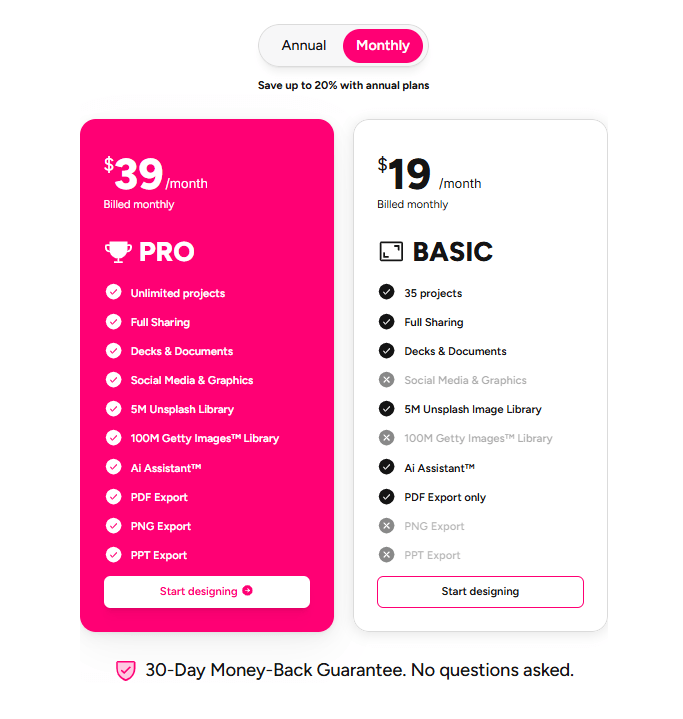
Key Notes:
Both plans include full sharing, an AI Assistant, and image libraries.
Pro allows unlimited project creation; Basic has a sensible 35-project cap.
30-day money-back guarantee, risk-free trial.
ROI: According to Typeset, most users save over $100 per asset (compared to outsourcing design work) and claw back 15+ hours per week.
Pros and Cons: The Honest Take
Let’s summarize where Typeset shines, and where it could get even better.
Pros
Drastically Reduces Content Creation Time: From ideation to design, everything is sped up by 10x or more.
AI Magic for Both Words & Design: No more toggling between writing in Docs and designing elsewhere.
Templates + Brand Control: Professional results with zero learning curve.
Remix and Export is a Game Changer: Repurpose one asset into dozens with a click.
Organized, Searchable Asset Storage: Find everything in seconds.
Real-Time Team Collaboration: Ideal for agencies and growing businesses.
Affordable: Much cheaper than ongoing designer costs or juggling multiple SaaS tools.
Cons
Design Customization Can Be Limited: Those seeking full pixel-level control (like Photoshop pros) may find the design options a bit too “done-for-you.”
Heavily AI-Driven Output: While powerful, some highly creative or unique layouts could need manual tweaking.
Relatively New: As with any fast-growing SaaS, features are being added regularly; occasional bugs or interface changes may occur as they scale.
Export Customization: Some edge-case export settings (like bleeding edges or obscure file formats) are still in development.
Who Should Use Typeset?
Content Marketers & Digital Agencies: Anyone producing ebooks, reports, posts, or presentations at scale.
Solopreneurs/Founders: Especially if you want to look like you have a full creative team on tap.
Coaches, Consultants & Educators: For creating courses, decks, and social promos quickly.
Corporate Teams: To ensure brand consistency and streamline asset creation across departments.
Freelancers: Scale your offerings and collaborate with clients more efficiently.
Who might not need it?
Hardcore visual artists or traditional designers want granular control.
Those who produce content less than once a month.
Expert Tips: How to Get The Most Out of Typeset
Start with an End in Mind: Clearly define your content goal, educate, sell, engage, and inform, so the AI generates on-point material.
Customize Your Brand Early: Set up your color palette, logos, and typography from the start for instant consistency.
Explore the Magic Wand: Don’t settle for the first design, remix and iterate!
Remix For Every Platform: Always export for multiple channels in one go; you save so much time.
Use Team Collaboration: Assign reviewers or ask for feedback with shareable links.
Organize Your Projects: Take advantage of built-in search and asset grouping from the start.
Final Verdict: Is Typeset The Right Pick For You?
If content creation is a major part of your business or side hustle, Typeset is a must-try. The platform radically simplifies the process, allowing you to outsource up to 95% of both writing and design to AI, potentially saving you thousands of dollars and hundreds of hours a year.
The learning curve is virtually non-existent. The output is professional and multi-channel by default. And the cost is far lower than what you’d spend hiring a freelance designer or buying a stack of niche SaaS subscriptions.
That said, if your work demands intricate, pixel-perfect artistry (think: bespoke magazine layouts or custom brand identities), you may miss ultra-fine-grained control. But for the web-centric, results-driven world of business content, Typeset is poised to become indispensable.
Frequently Asked Questions
Can Typeset really replace both writers and designers?
For most standard business content, yes! Typeset’s AI is now sophisticated enough to outline, draft, and design everything from ebooks and presentations to ads and social posts. For highly unique or technical material, you may still wish to tweak manually.
How does Typeset handle brand guidelines?
Set your colors, logo, and fonts once, and Typeset applies them across all exports, keeping you on-brand effortlessly.
Is Typeset good for teams?
Absolutely. Real-time editing and shared libraries make it ideal for growing agencies, companies, and groups focused on scalable, consistent output.
What if I only need to create one or two assets a month?
Typeset shines at scale. For occasional use, the Basic plan is affordable and includes a generous project limit.
Are there any hidden costs?
All features (including Getty Images access) are bundled in both main plans, with no surprise fees.
Can I use Typeset for client work?
Yes. You own your exported assets and can white-label content for clients.
Conclusion
In a world running on digital attention, content velocity and quality are your only real competitive advantages. Typeset makes delivering both easy, fun, and remarkably cost-effective. If you’re looking to publish more, grow your business faster, and finally leave the design grunt work behind, Typeset may be your new secret weapon.
Ready to try it? Explore Typeset’s free trial and design your next ebook, course, or campaign in minutes, not hours. You may never go back to old-school design again.


Ako Reviews Blog is a platform dedicated to helping online businesses reach their full potential. It offers in-depth guides on product reviews, social media marketing, and comprehensive online business strategies. Whether you're an entrepreneur or a marketer, Ako Reviews Blog provides practical tips and expert insights to help you grow and succeed in the digital marketplace.
Stay informed with valuable tips delivered straight to your inbox.
Created with systeme.io 2026 | Home | Privacy Policy | Terms and Conditions | Disclaimer | Contact