
How to Do a Complete SEO Audit in Under 30 Minutes Using Semrush
A complete, no-fluff guide to running a professional SEO audit using Semrush, even if you've never done one before.
Let me ask you something uncomfortable.
When was the last time you actually looked inside your website, not at the content, not at the design, but at the technical foundations holding the whole thing up?
If you're like most website owners, bloggers, or marketing managers, the honest answer is: never. Or maybe once, years ago, when someone mentioned "broken links" at a conference, and you spent an afternoon clicking around manually before giving up.
Here's the problem with that approach: Google doesn't give your site a pass just because you didn't know about the issues. Every day your website has a crawl error, a duplicate meta description, or a page that loads in five seconds instead of one, is a day Google is quietly penalising your rankings and sending your potential customers to your competitors instead.
The good news? You don't need a technical background, a developer on call, or an enterprise budget to fix any of this. You need one tool, a clear process, and about 30 minutes.
This guide walks you through a complete, professional-grade SEO audit using Semrush, the same platform used by over 10 million marketers worldwide, including teams at Tesla, Samsung, and IBM. By the end, you'll know exactly what's hurting your site, what to prioritise, and how to start fixing it today.
Bookmark this. You'll come back to it.
What Is an SEO Audit, Really? (And Why Most People Skip It)
Before we get into the how, let's get honest about the what.
An SEO audit is a comprehensive health check of your website. It analyses everything that affects how search engines crawl, index, and rank your pages, from the structure of your URLs to how fast your images load, from whether your internal links are broken to whether Google is accidentally indexing pages you never wanted it to find.
Think of it the same way you'd think about getting a car service. You wouldn't wait until the engine seizes to check the oil. You'd get it checked regularly, catch the small problems before they become expensive ones, and keep everything running smoothly. Your website works the same way.
So why do most people skip it?
Reason 1: They don't know where to start. SEO auditing sounds technical and intimidating. If you've ever opened Google Search Console and felt overwhelmed by graphs you don't understand, you know the feeling.
Reason 2: They don't think they have the time. "I'll do it next month" is the most expensive phrase in digital marketing. Next month becomes next quarter, and suddenly you've been losing ranking positions for a year without realising it.
Reason 3: They assume everything is fine. This is the most dangerous assumption of all. A site can look completely normal to a human visitor while being riddled with technical issues that Google's bots are quietly noting every time they crawl it.
Reason 4: They tried manual auditing, and it was hopeless. Clicking through pages to look for broken links, trying to read server logs, and manually checking meta descriptions one by one, it's not just slow; it's incomplete. You'll miss things every time.
That's exactly why tools like Semrush exist. They automate the entire detection process, surface every issue in a single dashboard, and tell you which ones to fix first. What used to take an SEO consultant two days now takes you 30 minutes.
What Does an SEO Audit Actually Check?
A thorough audit covers six main areas:
1. Crawlability: Can search engines actually access your pages? Robots.txt rules, noindex tags, and crawl budget issues can prevent Google from ever seeing your best content.
2. Indexability: Even if Google can crawl your pages, are they being added to the index? Canonical tag issues and duplicate content are the most common culprits here.
3. On-page SEO: Are your title tags, meta descriptions, H1s, and keyword placements doing their job? Are they optimised, unique, and within the right character limits?
4. Site architecture and internal linking: Does your site structure make logical sense? Can users and bots navigate it efficiently? Are there pages with no internal links pointing to them (orphan pages)?
5. Technical performance: How fast does your site load? Does it perform well on mobile? What are your Core Web Vitals scores? These are now direct Google ranking factors.
6. Content quality: Are there pages with thin content, duplicate content, or keyword cannibalisation issues that are confusing search engines about what each page should rank for?
Semrush's Site Audit tool checks all of these automatically, within minutes, and gives you a prioritised list of everything that needs attention. Let's set it up.
Setting Up Semrush Site Audit for the First Time
If you don't already have a Semrush account, you can start a free 7-day trial that gives you full access to every feature mentioned in this guide. No watered-down version, the real thing, with all data included.
Once you're in, here's how to run your first audit.
Step 1: Navigate to Site Audit
From your Semrush dashboard, look at the left-hand navigation menu. Under the "On Page & Tech SEO" section, click Site Audit. If this is your first time, you'll be prompted to create a new project.
Step 2: Set Up Your Project
Click Create project, enter your website's domain (without the www, Semrush handles both variations), and give your project a name. This is straightforward; don't overthink it.
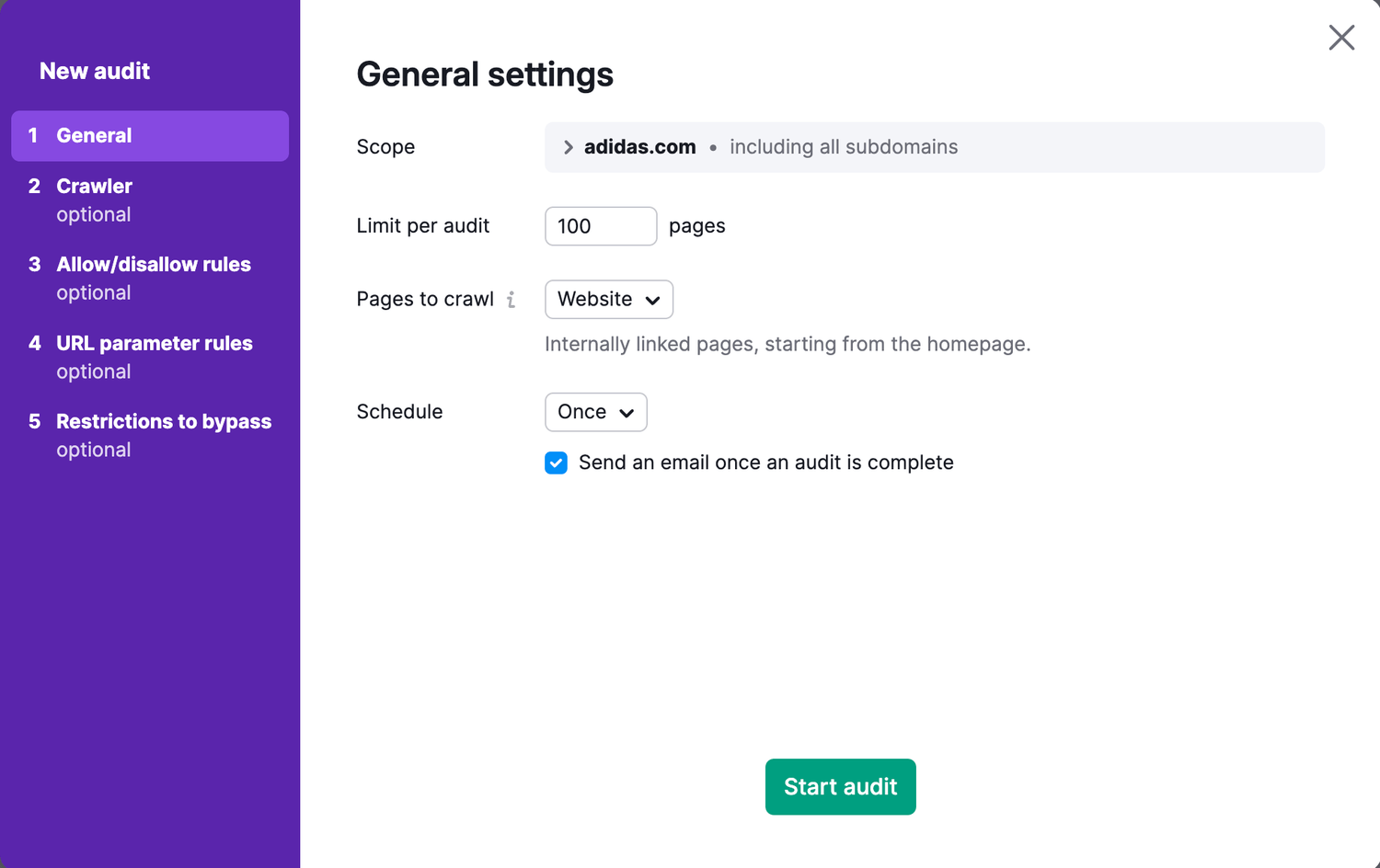
Step 3: Configure Your Audit Settings
This is the step most people rush through, and it matters.
When the configuration panel opens, you'll see several options:
Crawl scope: Choose "Website" to crawl all pages, or "Specific pages" if you want to test just a section of your site (useful for large e-commerce sites with thousands of product pages on first audit).
Crawl limit: The free trial gives you a crawl limit of 100 pages per audit. If you're on a paid plan, you can crawl up to 20,000 pages (Pro) or 100,000+ pages (Guru/Business). For most small to medium websites, 100 pages capture the core issues.
Crawl source: You can let Semrush crawl by following links from your homepage (the default and best option for most sites), or you can submit a sitemap URL directly, which is faster and more thorough for larger sites. If you have a sitemap (you should, more on that later), enter it here.
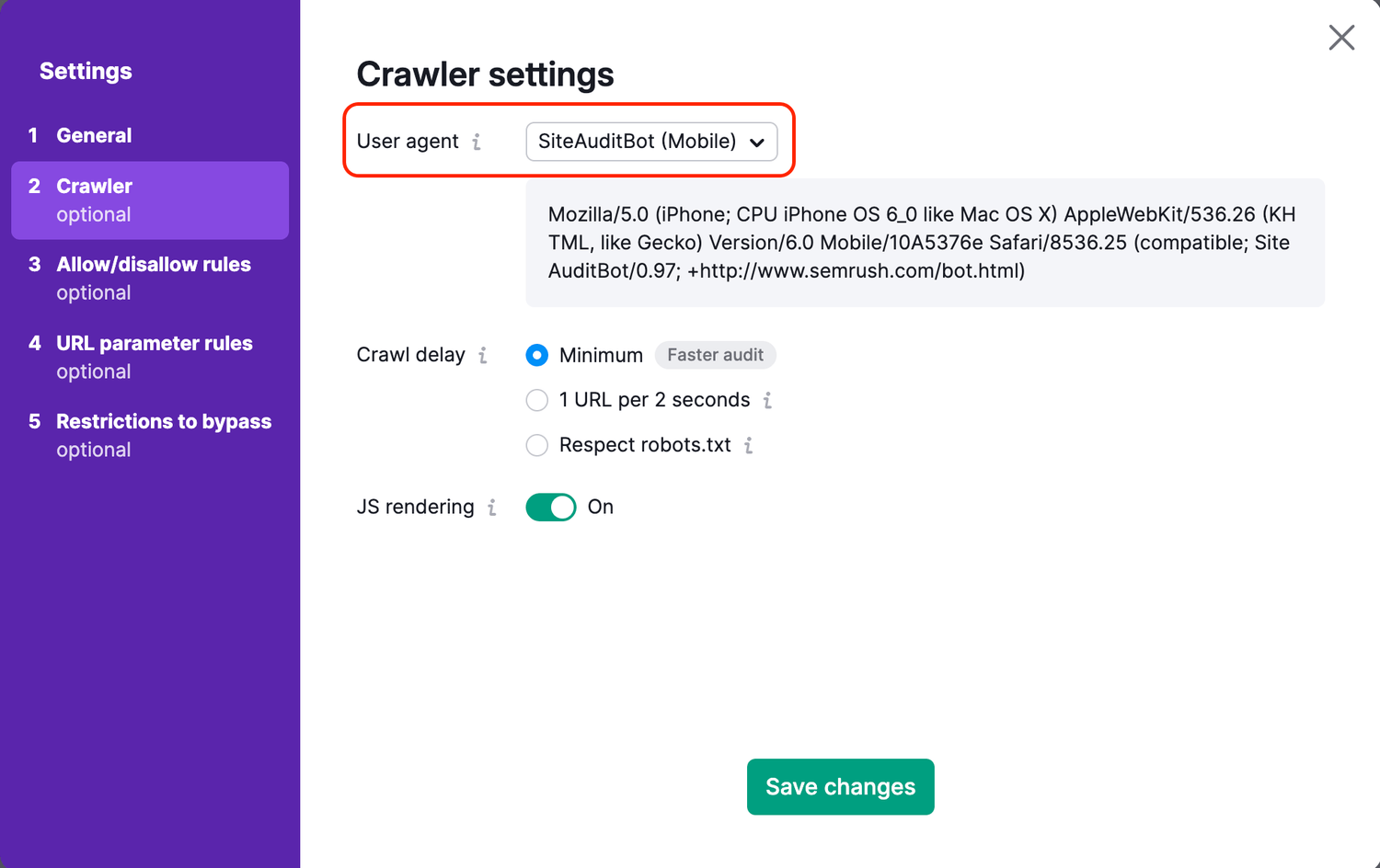
User agent: Leave this as "SemrushBot" unless you have a specific reason to test how Googlebot sees your site. For our purposes, the default is fine.
Respect/ignore robots.txt: For a complete audit, I recommend setting this to "ignore" on your first run. This lets Semrush crawl everything, including pages you may have accidentally blocked, so you get a complete picture. You can always adjust this for subsequent audits.
Schedule: You can run the audit once or set it on a schedule (weekly or monthly). For ongoing monitoring, a weekly schedule is worth setting up; it takes two seconds and means you'll catch new issues automatically.
Step 4: Start the Crawl
Click Start Site Audit and let Semrush do its thing. Depending on the size of your site, the crawl takes anywhere from a few minutes to half an hour. You'll see the progress in real time, and you'll get an email notification when it's complete.
While you're waiting, grab a coffee. When you come back, you'll have more data about your website than you've probably ever had in one place.
Reading Your Site Health Score, and What It Actually Means
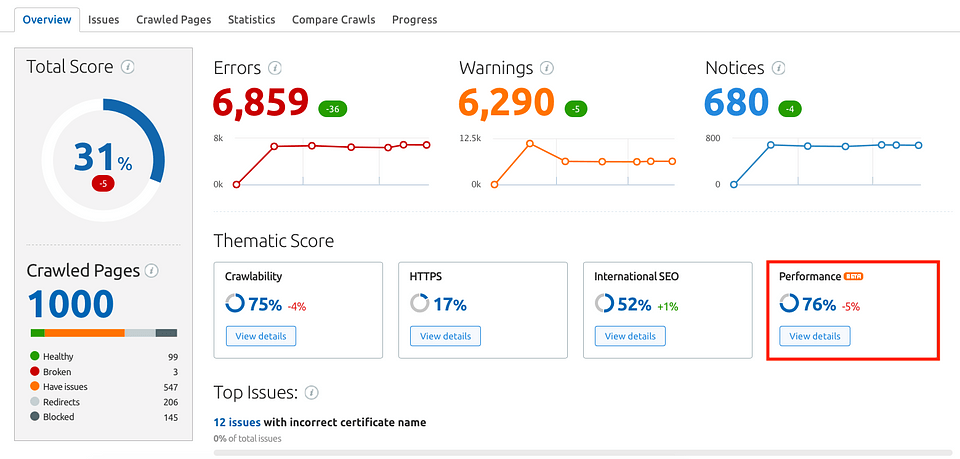
The first thing you'll see when your audit completes is a large number: your Site Health Score. This is expressed as a percentage, from 0 to 100, and it's Semrush's overall rating of how technically healthy your website is.
Here's what the ranges actually mean in practice:
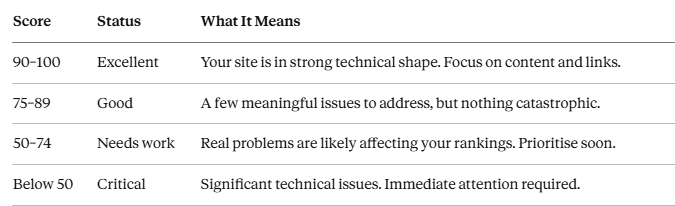
Don't be disheartened if your score is low on your first audit. Most websites, even professional ones that look great on the surface, score below 80 when audited properly for the first time. Knowing your score is the first step to improving it, and improvements tend to come quickly once you start fixing the prioritised issues.
Below the headline score, you'll see three categories:
Errors: shown in red. These are serious issues that definitely affect your SEO. Fix these first.
Warnings: shown in orange/yellow. These are medium-priority issues that can hurt your rankings or user experience but aren't as urgent as errors.
Notices: shown in blue or grey. These are informational issues or minor improvements. Address them after errors and warnings.
The breakdown also shows you total pages crawled, crawled vs. non-crawled pages (which can reveal crawl budget problems on large sites), and a graph of your Health Score over time, so you can see whether things are improving or getting worse after each change.
Now let's get into the specific issues you'll find, and exactly how to fix them.
The 7 Critical Errors to Fix First (And How to Find Them in 5 Minutes)
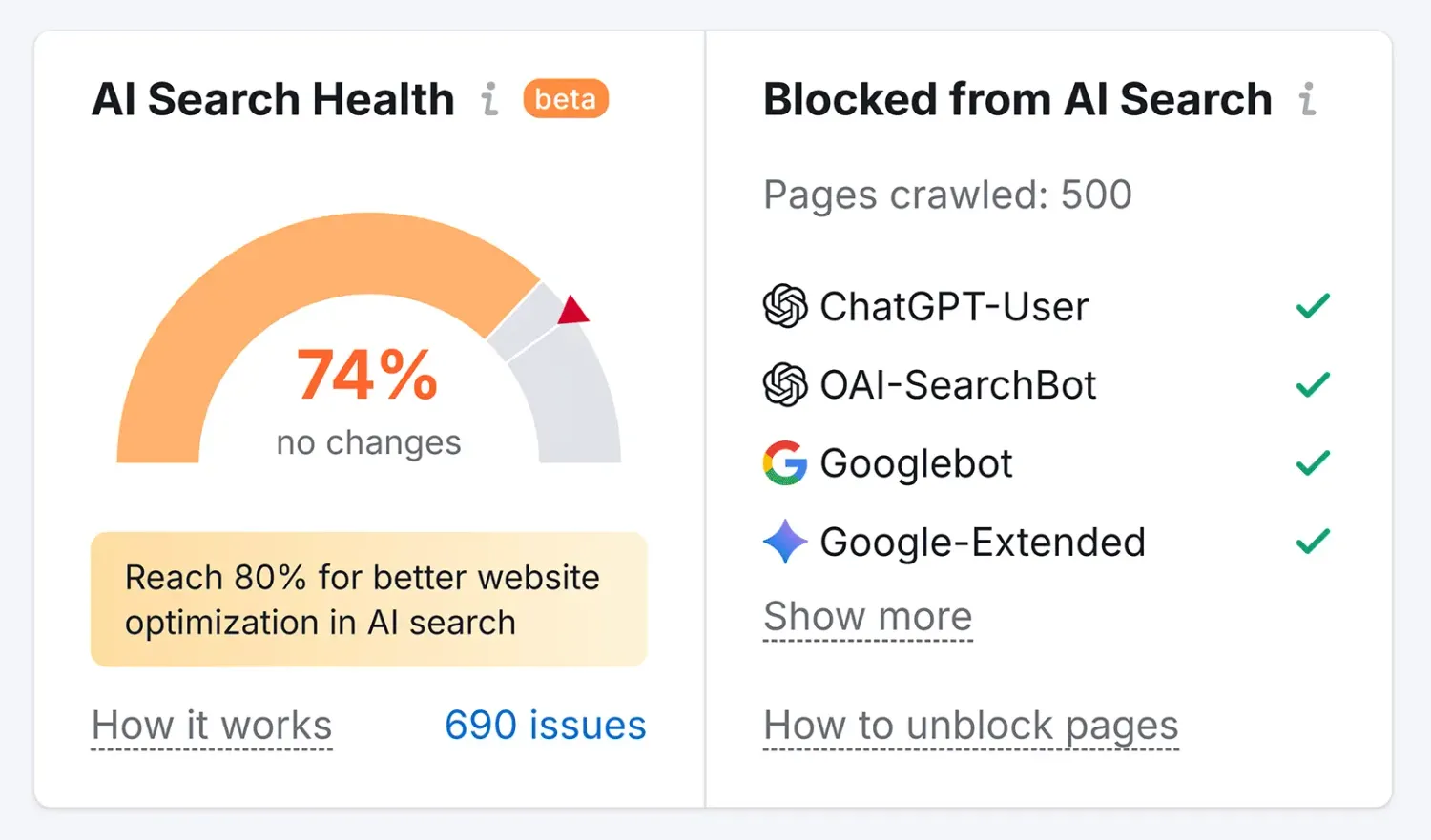
Semrush typically surfaces dozens of different issue types. Most of them matter, but not all of them are equally urgent. Here are the seven that consistently have the biggest impact on rankings, and which Semrush flags with the highest priority in its error reports.
Error #1: Pages Blocked by Robots.txt
Your robots.txt file tells search engine crawlers which parts of your site they can and can't access. Mistakes here, a misplaced wildcard, an accidentally broad "disallow" rule, can block Google from crawling entire sections of your site, or even your whole homepage.
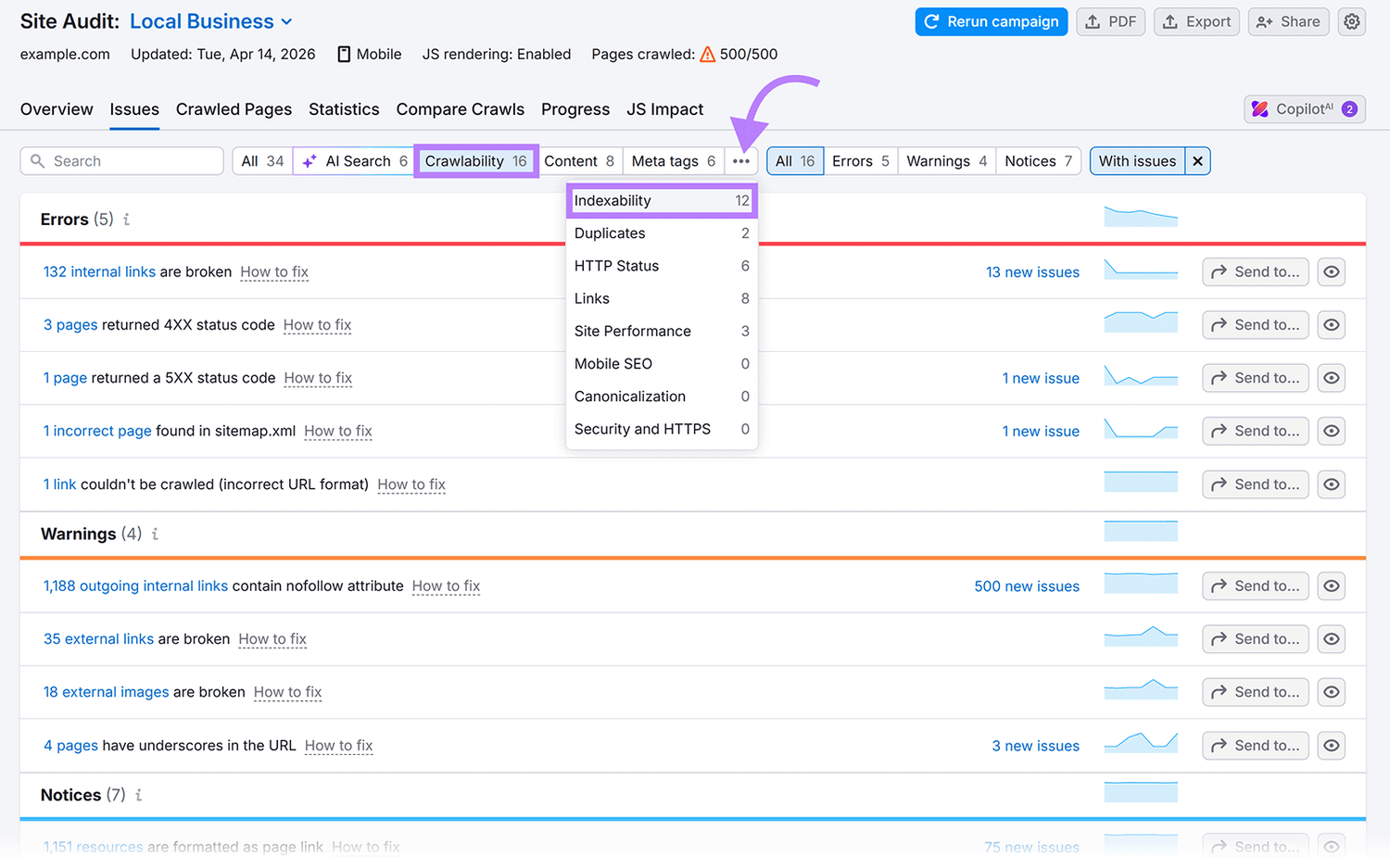
Where to find it in Semrush: Go to Site Audit → Issues → filter by "Crawlability" → look for "Pages blocked by robots.txt."
What to look for: If any pages you want indexed appear in this list, your robots.txt file has an error. The fix depends on your platform: most CMS systems (WordPress, Shopify, Wix) let you edit your robots.txt from within the admin panel. Remove or adjust the disallow rule that's blocking the page in question.
Pro tip: After every robots.txt change, use Google Search Console's robots.txt tester to confirm the fix works before your next Google crawl.
Error #2: Broken Internal Links (404 Errors)
A broken internal link is a hyperlink on your website that points to a page that no longer exists. When Google follows that link and hits a 404 error, it loses that crawl path. When a user follows it, they hit a dead end. Both outcomes hurt you.
Where to find it in Semrush: Site Audit → Issues → "Broken internal links" or filter by "HTTP status code: 4xx."
What to look for: A list of pages on your site that return 404 errors, along with the pages that link to them. Semrush shows you both sides of the broken link, which is crucial. Without knowing where the link comes from, you'd have to manually hunt it down.
How to fix it: You have three options. If the page was deleted but its content exists elsewhere, set up a 301 redirect from the broken URL to the new one. If the page was deleted and the content is gone, update the linking page to remove or replace the broken anchor. If the page was deleted accidentally, restore it.
Why it matters more than you think: Beyond the crawling issue, broken internal links waste your crawl budget, which on large sites can mean important pages aren't crawled at all, and they create terrible user experiences that drive up your bounce rate.
Error #3: Duplicate Title Tags
Your title tag is one of the most important on-page SEO elements you have. It tells Google and searchers what a page is about. If two or more pages share the same title tag, Google doesn't know which one to rank for which query, and it often just picks one, demotes the others, or ignores all of them.
Where to find it in Semrush: Site Audit → Issues → "Duplicate title tags." Semrush groups these by which pages share identical titles so you can address them systematically.
How to fix it: Write a unique, descriptive title tag for every page on your site. Each title should include the primary keyword for that page and be between 50 and 60 characters (so it displays properly in search results without being truncated). Think of each title tag as a unique answer to a specific search query.
A common culprit: E-commerce sites often have this problem on product pages with similar names, or on tag/category pages that the CMS auto-generates with template titles like "Products | My Store."
Error #4: Missing or Duplicate Meta Descriptions
While meta descriptions aren't a direct ranking factor, they have a significant indirect impact through click-through rate. A compelling meta description is the difference between someone clicking your result and scrolling past it.
Where to find it in Semrush: Site Audit → Issues → "Missing meta description" or "Duplicate meta descriptions."
How to fix it for missing descriptions: Write a unique, concise summary (120–158 characters) for every important page. Include the primary keyword naturally, lead with the most compelling benefit or information, and end with a subtle call to action where it makes sense.
How to fix it for duplicates: Same solution as duplicate titles, each page needs its own description. If you have hundreds of pages, prioritise your highest-traffic pages first using Google Search Console data to see which pages get the most impressions.
Error #5: Pages With Only One Internal Link (or None — Orphan Pages)
An orphan page is a page on your website that no other internal page links to. Google finds pages primarily by following links. If a page has no links pointing to it, there's a real chance Google has never crawled it at all, no matter how good the content is.
Where to find it in Semrush: Site Audit → Issues → "Orphan pages" or look in the Internal Linking report.
How to fix it: Identify the orphaned pages and then add contextually relevant internal links to them from other pages on your site. Ideally, link to them from pages that are topically related and that receive strong organic traffic or have high internal PageRank.
Why this surprises people: Content creators often publish articles and never think about linking to them from existing pages. If you have a blog with 50 posts, at least 10–15 of them are likely effectively invisible to Google.
Error #6: Slow Page Speed and Core Web Vitals Failures
Since Google's Page Experience update, Core Web Vitals (CWV) have been an official ranking factor. These are three specific measurements:
LCP (Largest Contentful Paint): How long it takes for the main content of the page to load. Should be under 2.5 seconds.
FID/INP (Interaction to Next Paint): How quickly the page responds to user interactions. Should be under 200ms.
CLS (Cumulative Layout Shift): How much the page elements move around as the page loads (annoying layout jumps). Should be under 0.1.
Where to find it in Semrush: Site Audit → Core Web Vitals report. This pulls real-world data from Google's CrUX dataset, so you're seeing what actual users experience, not just lab tests.
How to fix it: This is where things get more technical, but the most common causes are fixable without a developer:
Slow LCP: Compress and properly size your images. Use next-gen formats (WebP). Enable browser caching. Use a CDN.
High CLS: Specify width and height attributes on all images and videos. Avoid inserting content above existing content dynamically.
Poor FID/INP: Reduce JavaScript execution time. Defer non-essential scripts. Remove unused plugins or apps.
Error #7: HTTP Pages (Non-HTTPS)
If your site is still serving any pages over HTTP rather than HTTPS, fix this today. Google has treated HTTPS as a ranking signal since 2014, and modern browsers actively warn users that HTTP sites are "not secure," which destroys trust instantly.
Where to find it in Semrush: Site Audit → Issues → "HTTP URLs" or look at your HTTPS implementation report.
How to fix it: Install an SSL certificate on your domain (most hosts provide free ones via Let's Encrypt) and set up server-side redirects from all HTTP versions of your pages to their HTTPS equivalents. Then update your internal links, sitemap, and any backlinks you have control over to point to the HTTPS versions.
Identifying and Fixing Duplicate Content, Broken Links, and Crawl Issues
This section goes deeper into three of the most impactful and most misunderstood SEO issues that surface in almost every site audit.
The Duplicate Content Problem: It's Bigger Than You Think
Duplicate content is one of those issues that site owners often dismiss with "I don't plagiarise, so I don't have duplicate content." But the vast majority of duplicate content problems aren't about copying someone else's text. There are technical issues your site is generating automatically.
Here are the most common sources:
URL parameter variations. If your site adds URL parameters for filtering, sorting, or tracking, you might have dozens of "versions" of the same page. For example:
yoursite.com/products/shoes
yoursite.com/products/shoes?colour=black
yoursite.com/products/shoes?sort=price-asc
yoursite.com/products/shoes?ref=facebook
Google can interpret these as separate pages with identical content. This is extremely common on e-commerce sites and can result in hundreds of duplicate pages.
www vs. non-www. If your site is accessible at both www.yoursite.com and yoursite.com without a proper redirect choosing one as the canonical version, you have instant duplicate content across your entire site.
HTTP vs. HTTPS. Same issue, if both versions are accessible without redirects, Google sees them as separate sites with identical content.
Trailing slash variations. yoursite.com/blog and yoursite.com/blog/ can be treated as different URLs by some servers.
Printer-friendly pages or paginated content. Some CMS systems automatically create printer-friendly versions of pages or paginate long content without proper canonicalisation.
How Semrush surfaces this: Go to Site Audit → Issues → look for "Duplicate content" or "Pages with duplicate content issues." Semrush identifies pages with highly similar content and groups them so you can see the extent of the problem.
The fix: canonical tags. A canonical tag is a line of HTML code (in your page's <head> section) that tells Google which version of a page is the "master" version. For example:
html
<link rel="canonical" href="https://www.yoursite.com/products/shoes" />
This tells Google: "Even if you find this page at fifteen different URLs, this is the one I want you to index and rank." Most CMS platforms (especially WordPress with plugins like Yoast SEO or Rank Math) let you set canonical tags without touching code.
Crawl Issues: When Google Can't Do Its Job
Your crawl budget is the number of pages Google is willing to crawl on your site within a given period. For small sites, this isn't usually a concern. For larger sites (thousands of pages), it's critical, because if Google is wasting crawl budget on low-value or duplicate URLs, it may never get to your most important content.
Semrush's crawl analysis reveals several common crawl-wasters:
Redirect chains and loops. A redirect chain is when page A redirects to page B, which redirects to page C. Each hop wastes crawl budget and dilutes PageRank. A redirect loop (A → B → A) can cause crawlers to give up entirely.
Where to find them: Site Audit → Issues → "Redirect chains" and "Redirect loops."
The fix: Map out your redirect paths and consolidate chains so that page A redirects directly to page C, bypassing the middle steps.
Blocked resources. Sometimes CSS or JavaScript files are blocked in robots.txt, which prevents Google from rendering your pages properly. Since Google renders pages similarly to a browser before evaluating them, blocking rendering resources can make your pages appear broken to the crawler.
Where to find them: Site Audit → Issues → "Blocked resources."
The fix: Review your robots.txt and remove any disallow rules covering CSS or JS files unless you have a specific security reason to block them.
Large XML sitemaps or incorrect sitemap format. Your sitemap should include only indexable pages, not redirected pages, noindex pages, or 404s. Including non-indexable URLs in your sitemap confuses crawlers.
Where to find issues: Site Audit → Crawlability report → Sitemap section.
The fix: Regenerate your sitemap (most SEO plugins do this automatically) and audit it to ensure it only includes pages returning a 200 status code with no noindex tags.
Reading Your Health Score Dashboard: A Section-by-Section Breakdown
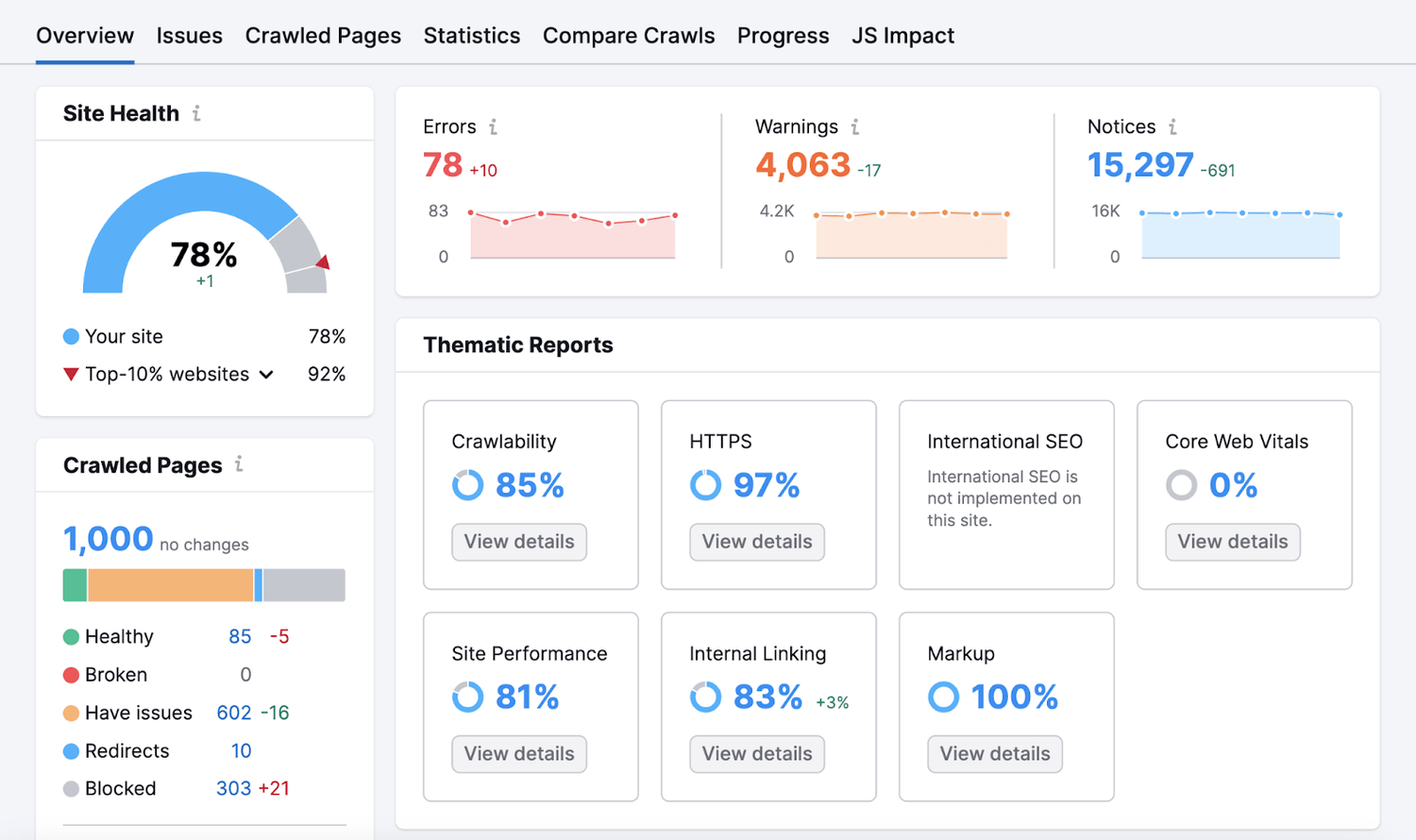
Once you're familiar with the main error types, the Site Audit dashboard becomes a powerful ongoing monitoring tool rather than just a one-time diagnostic. Here's how to read each section like a pro.
The Overview Tab
This is your command centre. The doughnut chart shows the proportion of errors, warnings, and notices. The trend graph at the top shows how your score has changed over time, crucially useful for spotting if a site change caused a sudden drop.
What to watch for: A sudden drop in Health Score, even one or two points, can indicate a site change has introduced new errors. Check the "New issues" filter after every site update, plugin change, or content publish.
The Issues Tab
This is where all the details live. By default, Semrush shows issues sorted by severity (errors first, then warnings, then notices). Each issue shows:
Total pages affected: so you know the scale of the problem before you start
Issue description: a plain-English explanation of what the issue is
"Why and how to fix it": Semrush provides an inline explanation for each issue. Click the "?" icon next to any issue for a detailed guide.
The affected URLs: click into any issue to see the exact pages it affects
How to use the filters: You can filter by category (Crawlability, Indexability, Site Performance, HTTPS, International SEO, etc.) to focus on a specific area. This is useful if you're handing off specific issues to different team members: your developer handles performance, your content team handles on-page issues, and so on.
The Crawled Pages Tab
This shows every URL Semrush crawled, with its status code, response time, page size, number of internal links, and more. You can sort by any column, which is especially useful for finding your slowest pages (sort by response time) or your most internally-linked pages (which reveals your de facto site architecture).
Hidden gem: Sort by "Inlinks" (internal links pointing to the page) in ascending order to quickly find your orphan pages and your most under-linked pages. These are often some of your most valuable content pieces that Google is barely noticing.
The Statistics Tab
This gives you aggregate data about your site, average page size, average response time, distribution of HTTP status codes, distribution of page types, and more. It's useful for spotting systemic problems. For example, if your average response time is 4+ seconds across the board, that's a server or caching problem, not a page-specific issue.
The Compared Crawls Tab
This feature is criminally underused. Every time you run an audit, Semrush stores the results. In the Compared Crawls tab, you can compare any two audit runs side by side to see exactly what changed. New issues, resolved issues, pages added, pages removed, all in one view.
This is your accountability tool. It proves the work you're doing is making a measurable difference, invaluable whether you're reporting to a client, a boss, or just yourself.
Building a Prioritised Fix List: The 80/20 of SEO Auditing
Here's the truth about SEO audits that most guides won't tell you: you will never fix everything. That's not pessimism, it's the reality of running a living, breathing website. New content gets published, plugins get updated, redirects accumulate, and new issues appear constantly.
The goal isn't a perfect Health Score. The goal is a better Health Score, achieved by fixing the issues that have the most impact in the least amount of time.
This is where the 80/20 principle becomes your best friend.
Tier 1: Fix These This Week (High Impact, High Urgency)
These are the issues that either block Google from crawling your site correctly or that have a direct, confirmed impact on rankings. If Semrush flags any of these, they go to the top of your list regardless of how many pages are affected.
Any page you want indexed that's blocked by robots.txt
Redirect loops (these can prevent crawling entirely)
Pages returning 5xx server errors
Missing canonical tags on duplicate content
HTTP pages on a site that's supposed to be HTTPS
Core Web Vitals failures on your highest-traffic pages
XML sitemap errors or a missing sitemap
Tier 2: Fix These This Month (High Impact, Medium Urgency)
These issues are impacting your rankings and user experience, but they're less likely to be causing catastrophic damage right now. Schedule dedicated time to work through these systematically.
Duplicate title tags across multiple pages
Missing meta descriptions
Broken internal links (4xx errors)
Orphan pages, especially those with strong content
Redirect chains (3+ hops)
Thin content pages (under 300 words)
Images missing alt attributes
Tier 3: Fix These This Quarter (Lower Impact, Lower Urgency)
These are refinements that cumulatively improve your site's technical health and user experience, but none of them alone will move the needle significantly. Work through them steadily after the higher-priority items are resolved.
Non-descriptive anchor text on internal links
Title tags that are too long (over 60 characters) or too short (under 10)
Pages with multiple H1 tags
Missing ARIA labels on interactive elements
Uncompressed images that aren't technically broken but are larger than they need to be
Outbound links to pages returning 4xx errors
How to Build and Manage Your Fix List
The most practical way to manage this process is to export Semrush's issues report and build a simple spreadsheet with five columns:
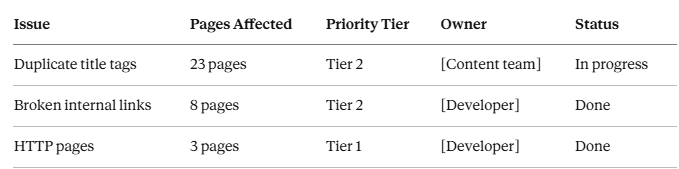
Review this list every time you run a new audit (weekly or monthly). Check off resolved items, add new ones that appeared, and make sure someone is accountable for each issue.
The Re-Audit Habit: Your Secret Weapon
The most impactful thing you can do after completing your first audit isn't to fix every issue; it's to schedule your next audit.
SEO auditing isn't a once-a-year event. It's an ongoing monitoring practice. Google rolls out algorithm updates thousands of times per year. Your site is updated regularly. Plugins break. Links go dead. Content gets added without proper on-page optimisation.
With Semrush's scheduled audits running weekly, you'll know about new issues within days rather than months. You'll catch the redirect chain that appeared after a site migration before it has time to tank your rankings. You'll notice the moment a new plugin starts generating thousands of duplicate URLs.
This is what separates sites that consistently improve their rankings from sites that plateau or slowly decline despite publishing great content.
Putting It All Together: Your 30-Minute SEO Audit Workflow
Let's compress everything above into a clear, repeatable workflow you can execute in under 30 minutes.
Minutes 0–5: Set up and launch your crawl
Log in to Semrush and navigate to Site Audit
Configure your project settings (crawl limit, sitemap URL, schedule)
Hit start and let the crawl run in the background
Minutes 5–15: Grab a coffee ☕ (while the crawl runs)
For small sites (under 200 pages), the crawl will likely be done before you finish
For larger sites, schedule this block for later in the day when you step away for a meeting
Minutes 15–20: Read your Health Score and error summary
Note your overall score and trend direction
Identify how many Errors, Warnings, and Notices you have
Look for any sudden spikes in specific issue categories
Minutes 20–25: Drill into your Tier 1 issues
Filter by "Errors" only
Click into each error type and note the scale (how many pages are affected)
Screenshot or export the most critical issues for your fix list
Minutes 25–28: Check crawlability and duplicate content
Review the Crawlability report for blocked pages and crawl errors
Scan the Duplicate Content report for URL parameter issues or www/HTTPS problems
Note canonical tag issues
Minutes 28–30: Build your prioritised fix list
Export the full issues report (CSV is fine)
Populate your tracking spreadsheet with Tier 1 and Tier 2 issues
Assign owners and target dates for each
That's it. In 30 minutes, you have a comprehensive picture of your site's technical health and a clear action plan for improvement. No developer needed, no technical degree required.
Advanced Semrush Site Audit Features Worth Knowing
Once you've run a few audits and worked through your initial backlog of issues, there are some additional Semrush features that take your auditing practice to the next level.
JavaScript Rendering
By default, Semrush crawls your site similarly to how an older-generation Googlebot would, without fully rendering JavaScript. If your site is built on a JavaScript-heavy framework (React, Vue, Angular, Next.js), this can mean Semrush misses content that's only loaded by JavaScript.
Enable JavaScript rendering in your Site Audit settings to get a more accurate picture of what Google actually sees when it renders your pages. Note that JS rendering takes longer and uses more crawl budget, so use it selectively.
Log File Analysis (Advanced)
Semrush can import your server log files and show you exactly how Googlebot has crawled your site, which pages it visited, how often, and in what order. This is the gold standard of crawl analysis and reveals crawl budget issues that even a thorough site audit might miss.
If you have access to your server logs (ask your host if you're not sure), this is worth doing at least once a year.
Integration with Google Analytics and Search Console
Connect Semrush to your Google Analytics and Search Console accounts to overlay your traffic and ranking data onto the audit results. This lets you see, for example, that the pages with the worst Core Web Vitals scores are also your highest-traffic pages, and therefore most urgently need attention.
Tracking Health Score Improvements Over Time
Set a reminder to check your Health Score trend once a month. As you fix issues, you should see it climb steadily. If it drops, despite your fixes, it signals that something new has been introduced. The Compared Crawls feature will pinpoint exactly what changed.
Common Questions About SEO Auditing (Answered Honestly)
"My site scored 45. Is that catastrophically bad?"
Not as bad as it sounds, and very fixable. A score of 45 usually means there are a handful of systemic issues generating many flagged URLs, often something like missing meta descriptions across all blog posts, or URL parameter issues generating dozens of duplicate pages. Once you fix the root cause of these systemic issues, you'll often see your score jump 20–30 points in a single audit cycle.
"How often should I run an audit?"
For most sites, monthly is a sensible minimum. If you're publishing content frequently, making regular site changes, or running an e-commerce site with frequently-changing inventory, weekly is better. Semrush's scheduled audits make this effortless; set it once, and the data is there every week without you having to do anything.
"Which issues does Google care about most?"
The ones with the most direct ranking impact, in rough order: crawlability blocks, HTTPS issues, duplicate content with no canonical resolution, Core Web Vitals failures, broken internal links, and missing title tags. Meta description and minor on-page issues are important for user experience, but have less direct ranking impact.
"Do I need to fix every issue Semrush flags?"
No. Some notices are genuinely low-impact or don't apply to your site's context. For example, Semrush might flag that your internal links use generic anchor text like "click here," which is worth improving over time, but isn't going to tank your rankings in the meantime. Use your judgment and the Tier system outlined above to focus your energy where it matters most.
"I fixed an issue, but it still shows in the audit. Why?"
Semrush updates based on its last crawl. After making fixes, manually trigger a new crawl (click "Re-run campaign" in Site Audit) and wait for it to complete. The resolved issues will then disappear from your report. Google's index update may take additional time. Fixing the issue is step one, but Google needs to re-crawl the page before the ranking benefit materialises.
What an SEO Audit Actually Does for Your Business
Let's zoom out for a second.
All of this, the broken links, the canonical tags, the Health Score, the crawl budget optimisation, it's all in service of one thing: making it easier for the right people to find your website when they search for what you offer.
Every error Semrush flags represents a gap between where your site is and where it could be. Every issue you fix is a small step toward higher rankings, more organic traffic, and ultimately, more revenue, leads, or whatever your site exists to generate.
The sites that consistently rank well aren't always the ones with the most content or the highest domain authority. They're often the ones that do the unglamorous, consistent work of keeping their technical foundations solid.
A site audit is how you see those foundations clearly, maybe for the first time.
And 30 minutes, once a month, is all it takes to stay on top of them.
Ready to Run Your First Audit?
If you haven't already, start your free 7-day Semrush trial and run your first site audit today. The crawl is free, the data is comprehensive, and you'll have a clearer picture of your website's technical health within the hour than most site owners ever get.
👉 Start your free Semrush trial here →
No credit card required for the trial. Full access to Site Audit, Keyword Research, Competitor Analysis, and everything else in the platform.
And if this guide helped you, bookmark it, share it with a colleague, or drop it in a Slack channel. Someone on your team is probably overdue for an audit.


Ako Reviews Blog is a platform dedicated to helping online businesses reach their full potential. It offers in-depth guides on product reviews, social media marketing, and comprehensive online business strategies. Whether you're an entrepreneur or a marketer, Ako Reviews Blog provides practical tips and expert insights to help you grow and succeed in the digital marketplace.
Stay informed with valuable tips delivered straight to your inbox.
Created with systeme.io 2026 | Home | Privacy Policy | Terms and Conditions | Disclaimer | Contact